You can see from this image — http://perfectionkills.com/images/minifier_benchmarks.png — that pages under 100KB are all under a second. But then it grows. I suspect regex parsing (not catastrophic but close) to be the culprit. If you have time to look into it and optimize — that would be super helpful, of course!
The 7.7s to process a 400KB page (Wikipedia) is particularly surprising. Assuming a processor that executes ~2 billion instructions a second, that's roughly 37,000 instructions executed for each byte of input, or a throughput of ~52KB/s. I wonder where all the time is being spent, as from my understanding minifiers just parse the input document and then write it out in some smaller canonical form.
Also, please, whenever you publish benchmarks, always include the specifications of the system they were performed on! 52KB/s may be horribly slow on a 3GHz i7 but pretty good for a 100MHz Pentium.
Note that "max" settings were used, meaning that, for example, both JS and CSS had to be minified (and that's delegated to UglifyJS2 and clean-css packages correspondingly).
I'd have to agree, while not exactly the same, Google's closure compiler only starts to take a noticeable amount of time when you get into the thousands of lines.
The workarounds to handle client-side templating seem dirty. Is it really true that e.g. Handlebars requires you to send illegal HTML to the browser? That seems like such a bad idea.
It's not so much about invalid HTML as it is about superset of HTML. I don't like it either but certain constructs seem hard to implement otherwise. Changing attribute value is easy within HTML boundaries but anything related to presence of attribute and they have no choice but to wrap it somehow (they could wrap it with other attributes, of course, but that would probably be too verbose).
I've been using <script type=”text/html“> to hold bits of HTML I want to quilt together client-side.
I build all my templates in HTML, and then store all the different content to populate the templates in script tags. I can then use JavaScript to swap it out, and even hide/reveal unused templates.
It's 100% valid though, handlebars are not valid HTML, at least not until processed and rendered.
The <template> tag is meant for that - not only are the contents inert, but they're also exempt from HTML5's special processing rules, so you can eg. put them in tables without having them foster parented.
The big issue right now is IE support, but most browsers are coming along with it:
One of the reasons I added this support was so we could use the parser on our client-side handlebars templates to identify glyph usages and build the smallest possible custom fonts.
Google minifies HTML on basically all its properties. It's probably about a 50% savings in bytes, which translates to (on my Comcast connection) about 250ms in network latency saved. Multiply out by rough estimates on queries/day and it saves a human lifetime every 2 days.
Repeated experiments - by Google, Amazon, and many smaller websites - have shown that lower latency directly translates to higher conversion rates, so I wouldn't be surprised if this results in billions of dollars of extra commerce, and even a small website would get noticeably higher revenue if they did this. Google also ranks faster websites higher, and so you get an SEO benefit as well.
Chrome DevTools timeline inspector. Loaded www.google.com/search?q=foo on Network tab, clicked into details, selected Timing tab, and took only the Receiving time, skipping the Waiting portion.
It's a little inaccurate because Google Search uses chunked encoding, and so it sends the header immediately, even before the search has finished, then blocks as the search request comes back. Plus there are usually inline images at the end of the response, but I chose my query to avoid them. It should still be pretty close to the general ballpark.
To me the more interesting scenarios aren't related to size.
* Being able to embed comments which aren't visible to the world is very useful.
* Being able to remove non-important whitespace removes clues on the complexity of generation (though it's a super-complex thing to actually remove only the non-important whitespace thanks to <pre> and CSS styling).
* Linting is another area where things are interesting too. Validators might tell you if your HTML is well structured per the specs, but my js skills and habits have improved as a result of linting. The process might tell you that it's best practice to use readonly instead of readonly="readonly" on an element or similar. Sure, not directly related to minification, but the parsing needs to be done already.
* Minification adds some security through obscurity by making stuff like XSS attacks slightly more difficult (if you use name/id/class mangling). I've only seen this in practice on gmail (most gmail browser addons/scripts break every couple of months when google changes something that alters the generated button ids)
I haven't seen minification done on raw HTML, but have seen non-html solutions used in order to be able to include comments - this is a bit dumb to me.
I've used HTML preprocessors to concatenate separate (single page app) html resources (templates) for delivery, so the pipeline's already there.
I don't see why this might as well not be the default, if more browsers' source view would just de-minify CSS/HTML/JS automatically.
EDIT: Especially in mobile/touch-only browsers who are extremely unlikely to inspect the code. So do it for m.example.com, I reckon.
I myself have gotten a little lazy, because I'm hosting my static websites behind CloudFlare who do minification anyway, so I haven't thought much of this in a while.
Pays off? There might be little to gain from it, but on the other hand there is barely anything to lose. If you can shave 10% of your 200k pages in the couple of seconds the benchmarks took, I don't see why not.
Most developers already have a build system to concatenate and minify javascript and css files, plugging in the html minifier is straight-forward and doesn't add any additional complexity really. And since the minification is done at build time on a build machine (not request time on a production server), there is no impact on server side load.
If you were doing templating and dumping in data as I assume most server rendered pages are, it'd probably reduce server side load as you have fewer characters per template
I agree with you if you mean to say that it introduces complexity and server side load if you run it on a per-request basis. Considering the time it takes to minify, this obviously isn't the use case that the developers had in mind. Most likely it is meant to run as part of a build system of a mostly static website, and not on the server itself.
I agree. Plus if you activate any kind of caching / gzip compression the difference in the end is minimal. (entropy roughly the same => document roughly the same size)
You don't want to use HTTP or TLS compression when using TLS. Because compression breaks TLS. And then Russian hackers can steal your session ids and CSRF nonces.
To me it's mainly for cosmetic purposes -- partly because Google does it and I want to be like Google -- and because I want to give a little "fuck you" to my competitors who will inevitably try to read my source.
I really would like to see a comparison of the minified + gzipped vs just gzipped vs just collapsing all multiple blank spaces into a single ones + gzipped


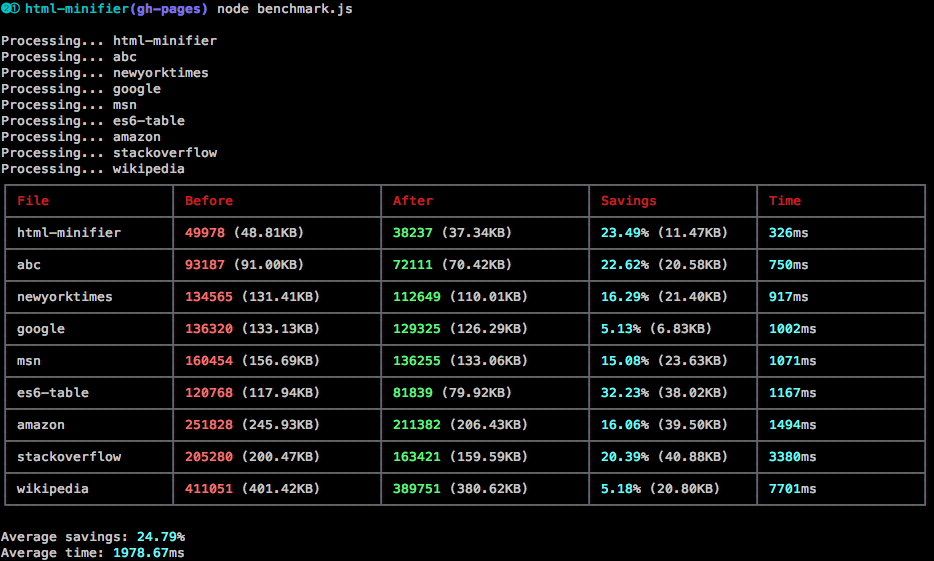
Wow. Yes. I would even say taking more than a single second is pretty unacceptable. There's a bad algorithm in there somewhere...