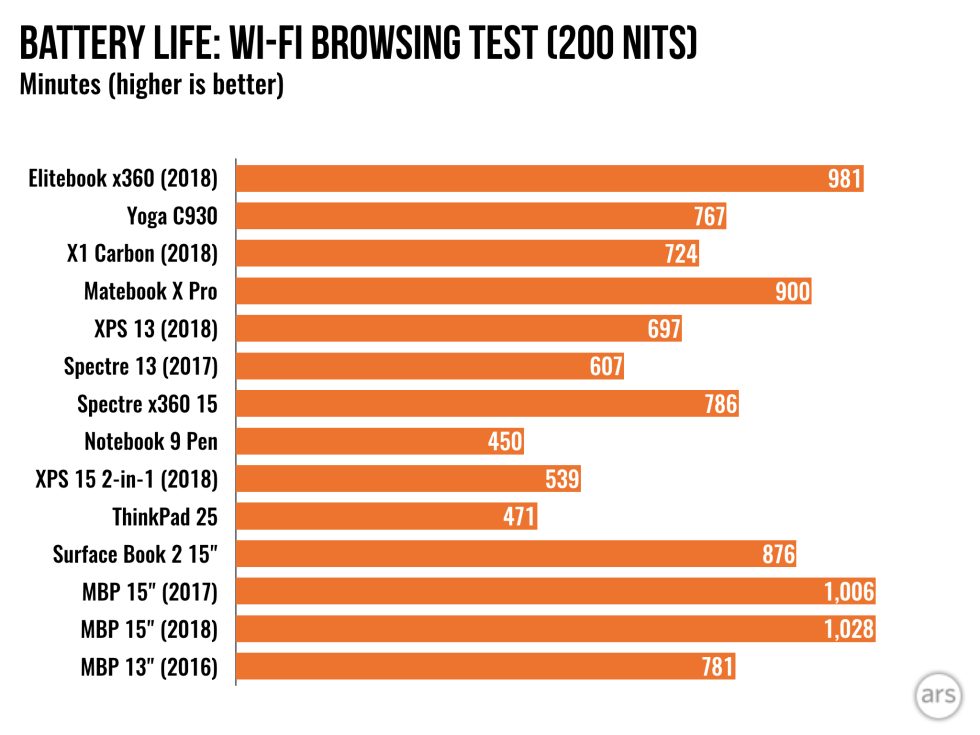
My faith in Apple would be completely redeemed if they took the 2015 Macbook Pro, put current gen hardware in it, maybe add a couple USB-C ports, and call it the 2019 Macbook Pro. My personal computer is a 2015 and my work is a 2017, and there are zero features from the 2017 that I prefer.
I recently upgraded from the 2015 to the current gen.
2015 pros:
* Better battery life
* Way better keyboard
* More robust
* More useful port selection
* Trackpad is a more reasonable size
2018 pros:
* Way better speakers
* Slightly better screen
* Lighter
* Faster
* Trackpad is not mechanical
* Finger print login is useful
I'd really love a proper "pro" macbook pro, that sacrificed a bit of the thin-and-lightness for an actual professional level of stuff (better cooling, more ports, bigger battery, no touchbar)
I updated from 2012 to 2016, hated and sold it after a couple of keyboard fails, and bought a 2015. My next Macbook will probably be a Thinkpad way things are going.
The better speakers I'd like. I still need to use USB sticks and SD pretty frequently and have always hated bags of adaptors. They always seem to break or get lost at the moment you're sitting with the important client.
The rest seems to come with a cost far worse than the benefit (for me anyway).
Larger trackpad was so large I would constantly get false activations when typing. Perhaps I have the wrong sort of fingers.
The touchbar was constantly activating when I typed on the top row of physical keys. Perhaps I have the wrong sort of fingers again. :)
The newer thinner keyboard was both horrible and horribly unreliable. Dust sensitive? LOL I think back to when the kids were little and throwing rusks, or putting toast in the VCR the moment we blinked. Then the amount of dog and cat hair (that magically gets everywhere) that's been removed from our keyboards over the years.
Lighter is OK, but not at a huge battery life cost compared to the 2015.
Well, don't get the Thinkpad for better speakers. Speaking as an owner of a new t480s, whose dumb idea was to put speakers on the bottom of the case? My lap don't have ears. Of course the battery life is even worse than the bad 2016 Macbook, not by much though. But it's not whatever double digit hours they claim. If you think apple makes nonsensical design decisions, try any windows laptop, apple is still miles ahead in certain areas. Windows is so bad it's not even funny anymore (for example cortana guided setup is disturbing) and don't get me started about linux.
If by holding your hand you mean stuff works out of the box, then yes it isn't great. I did manage to get hidpi working in just 1-2 days (not with wayland, nothing works on wayland, let's give it just 5 more years and I'm sure it will happen), and it also goes to sleep fine, trackpad is not as bad as I expected it to be. All perfectly great achievements for 2018.
xubuntu versions running perfectly on my Thinkpad E550 (and Desktop) for many years already.
Raspbian on my PI's and ubuntu on my beaglebone black.
Don't settle for the provided software configuration. Settle for the open tool that is made for support.
How many rooms in a house do people really watch movies in? A couple of bluetooth speakers covers the 95% case, and just using the crappy laptop speakers or use earbuds or headphones for the 5% case.
Of course it would be nicer if the laptop had better speakers in it, but there are always trade-offs to be made on cost vs benefit, and fairly cheap bluetooth speakers are a pretty good workaround for a lot of people.
Not sure why you call the macbooks speakers crappy, i would imagine most people would consider them good enough and be happy with then instead of dealing with external Bluetooth speakers and carrying them around with the laptop.
My comment wasn't meant to be macbook specific. Most laptop speakers don't sound as nice as a reasonable set of bluetooth speakers or headphones. The main point of my comment was to counter the (strawman) idea that the only option for someone who didn't like the laptop speaker was to carry around a bluetooth speaker with them from room to room, which is of course not very practical. But having a couple of them strategically placed in the house is affordable and practical for most cases.
Now instead of a room think about a house or a office, is your idea of carrying a speaker everywhere still practical or do you think adding a speakers on laptop is more practical?
I think you've misread/misunderstood my comment. I'm trying to say that carrying around a bluetooth speaker IS impractical (and the initial criticism of it a type of strawman argument because it's obviously impractical). I'm not suggesting in any way that carrying around a speaker everywhere is a good idea (it's not).
What I'm trying to say is that if really good audio quality is important to you, then having a couple of sets of bluetooth speakers in your house strategically placed in the places where you'd regularly watch movies or consume other high-quality audio is a reasonable workaround for a lot of people. OF COURSE having better speakers (equivalent in sound quality to the bluetooth workaround) in your laptop would be better if you care a lot about audio quality. But that would add to the cost of the laptop for every user, even the ones that don't care about having really high-quality audio on their laptop. I'm saying that it's not unreasonable for a manufacturer to make some tradeoffs like that when there are workarounds that work fairly well.
Over time the costs of adding higher-end features like this drop, and things like audio quality improve to the point that the workarounds aren't needed (the audio quality of my phone speaker is actually pretty amazing).
By a strange coincidence I'm also in the group of people using their Macbook Pro while sitting on the sofa, due to not having a tv. I wouldn't use a dedicated TV enough to justify having one.
I agree to most things, with the minor correction that the trackpad on the 2015 is also not mechanical (and works fine, I also like the size better).
Regarding the screen I observed: The 2017 has better colors. However it is far more of a dust and dirt magnet, and harder to clean. It seems like the coating or glass might be different, which allows more dust and grease to stick. As a result the display of my 2015 looks mostly clean, the 2017 is messed up as soon as I use it for two hours and have it in my backpack.
All in all I like the 2015 more. They should have just replaced the DisplayPort/TB2 connector with USB-C/TB3 and it would have been fine. The extra lightness of the 2017 is nice to have, but from a practical standpoint the form factor of the 2015 was already great.
To those of you that complain about battery life. I noticed that using Safari as my browser gives me almost an hour extra compared to Firefox.
To me it seems that newer CPU may be more efficient overall, but they seem to consume more power under medium to heavy load.
My front-end dev colleague used to tell me to use a "proper" browser (i.e. Chrome) because I favoured Safari and even with DevTools. I said it gives me more battery life on a MacBook!
Yeah I went from 2014 to 2017, and went from broadly not worrying about doing 6 hours of solid dev work without thinking about battery to essentially never feeling comfortable away from a plug.
I'd guesstimate I get at most 3 hours on the 2017 before the battery level gets low enough I have to start planning where I'll next plug in. Not ideal.
Many people would describe an hour's difference to be a "significant" change, especially when a scale of around 10 hours total battery life is being considered.
Sure, but considering the "fudge factor" that Apple often applies for their battery life estimates ("casual browsing", etc.) an hour isn't all that much.
That's kinda the point... Instead of using more energy efficient new gen CPU to add ~3 hours of life, Apple used it to make the already perfect laptop insignificantly thinner and lighter by reducing the battery size.
This isn't my experience at all, I have a 2015, a 2017 and 2018 MacBook pros. The 17 isn't all that tbh and I only have it because they replaced my 16 model. The battery isn't all that and the keyboard is a big dodgy. The 2018 though is absolutely fine, the battery is great and the keyboard has been fine the whole time. I have to use the 2015 for one of my contracts and Im always glad to get back to the 2018.
I just replaced the battery in my Early 2015 MacBook Pro Retina 13.
When it was new i would regularly get ~12 hours of light usage from it (safari, email, terminal, VPN, citrix, remote desktop). It has been providing around 8-9 hours steadily for the past year or so. I finally noticed when placed flat on a table it wasn't sitting flat, and the battery was swollen.
Now with a new battery we're back to 12+ hours of light usage.
i had a 2016 mbp, and it had (IIRC) ~7000mAh battery. My 2015 mbp had ~8800mAh. The battery itself was smaller in the 2016 model, presumably for thin/weight.
My old 2015 MacBook Pro without a discrete GPU had amazing battery life. I'd get at least 8 hours, and over 10 if I wanted to sacrifice some of the brightness and turn bluetooth off. I got upgraded to the discrete GPU model and I could get at most 6 to 7 hours for the same workload.
Nowadays, you can't even get a 15 inch MacBook Pro without a discreet GPU.
exactly ;) so well-designed that you can't even tell it's non mechanical (unless you turn the clicky sound and vibrations off)
I still prefer the 2015 Macbook Pros to the current release and that's just sad. How is it so easy for Apple to throw away so much good design research and implementation? They don't even have the mag-safe chargers, nor the the battery indicator lights on the chargers, what a step backwards on such simple but great functionality!
I own a 2015 Macbook since the launch in 2015 (duh), and I remember letting people use my force touch trackpad saying that it doesn't 'click'. Took almost everyone at least several minutes to convince them that the trackpad doesn't actually click. :-)
Furthermore I do agree with you on pretty much every point. I don't like my 2017 Macbook and I most certainly won't upgrade my 2015 to any new pro laptop.
Whoa, I switched to a 2015 MBP last year and didn't know about force touch yet. Time to repeat the onboarding I guess, there is some incredibly useful hidden UI.
Better cooling, definitely. My machine gets quite hot on my lap unless I have it turn on the fans earlier using Macs Fan Control. I'm using it as a pro machine, so it's running a bunch of docker containers, Slack, VS Code, a million tabs across Firefox and Chrome. It's a busy machine and it doesn't need to be silent if that means it's hot enough to be uncomfortable on my legs and hands.
It's discouraging to hear the 15" MBP GPU's still have heating/failure issues, I toasted a few 15" MBP GPU's in 2006-2009. Not sure what the point is to have a GPU in a laptop I don't use.
Firefox burns through battery rapidly too. Seems that you have to stick with Safari to get good battery life out of an MBP - it makes a very real difference
I switched to Safari when it added favicons to browser tabs the other month. The CPU-usage/battery difference is huge. I also like the new Safari extension paradigm and have ported some extensions of my own that could be improved by moving CPU-bound work to Swift.
I have Chrome only for the built in Flash. I don’t play many flash games these days, but I don’t know what I’m going to do when Google finally strips that out. Seems like Kongregate has drifted towards Unity but there are a few classics, and I have an old game that a friend and I made a long time ago that I like to play from time to time.
I upgraded from a 2017 13" MacBook Pro touch bar to 2018 15" MacBook Pro touch bar, and noticed a huge improvement.
  - 6 cores (12 threads) was absolutely noticeable
  - NVme disk performance is much faster
  - 2nd generation butterfly keyboard is much improved
  - Speakers are way louder, bassy, and crisp
  - 15" screen is much better in terms of real-estate than 13"
You actually have the 3rd gen butterfly keyboard. The first gen was only on the 12“ MacBook series. And that one was really bad (have zero feedback). The 2nd gen on the 2017 is bearable, but doesn’t seem to be long term reliable
My ideal laptop would be a 2015 Macbook Pro with Thinkpad keyboard (the older one before Lenovo moved all the keys around) and trackpoint. Preferably without the trackpad at all like was an option on older Thinkpads. On my last Thinkpad you could customise the trackpad to activate differently and do entirely different things to the trackpoint. Useful for a select few apps. I ultimately disabled the trackpad as I didn't use those few often enough.
Middle click scroll whilst still typing, as your fingers stay on the home keys. Precision and acceleration that's leagues ahead of every trackpad, including Apple, and faster than moving hand to a mouse. OK, I know quite a few seem to struggle with a trackpoint when first using by using actions that worked on their trackpad and other oddities. It's so long ago I forget my first encounters and learning curve.
I carry a small mouse around with the Macbook. When I have used Thinkpads I never carried a mouse and often didn't use the mouse at my desk either.
Mine would be a new X220 form factor thinkpad with modern battery tech and... any linux OS. It's OK though; I've got enough X220s and batteries to last me the rest of my career.
I've never developed the muscle memory to be effective with the trackpoint, but it does have the distinct advantage of being usable without taking your hands off the keyboard.
I can use it without moving my hands away from home-row position, I can drag-n-drop much more easily than a trackpad, middle-clicking and right-clicking are both more consistent, and I can scroll indefinitely in any direction without picking up my hands.
This is probably just me, but when using my laptop on my lap, if I were using the trackpad i would have to bring my hands down closer to my body which is less comfortable, or move my laptop further away from me.
Can you provide some info into how you typically use trackpoint. Which fingers do you use and how do you control the acceleration when going few pixels away or whole screen corner to corner. What about the clicks.
I have a thinkpad and am always curious on how to effectively use it. Even a video of someone using it might help.
Treat it as a tiny proportional joystick, which it is. I use index finger of dominant hand. Press hard and it'll fly the cursor across the screen. Press gently and it'll give excellent precision. If you keep overshooting, you haven't adjusted to gently enough. It is less movement and more thought for pixel perfect precision as you can barely feel any feedback but still get movement.
I always have to turn up acceleration, but rarely sensitivity, in Trackpoint settings a notch or two for my own preference. For me, if I turn sensitivity down, it ruins it. YMMV.
I will left, right and middle click with thumbs as they're just below space and land there naturally.
Thumb on middle and drag to scroll at pressure sensitive speed for as long as you press. No need to "reset" when you reach the end of trackpad or finger on scrollwheel. Two thumbs and index finger means select and paste are almost as fast as vi-only approaches, as it's placed so you're essentially still typing. :)
I realize the original poster responded, but I am currently in the process of going through this transition and my experience may be of use to you.
The thinkpad was the latest machine I got, after a string of macbooks and one XPS-15. I made a concerted effort to switch simply because I'm spoiled on OSX trackpads, and the thinkpad trackpad widget just isn't up to par (especially on ThinkPad + Linux). I asked a few colleagues how they got around the trackpad issue and a couple mentioned they just use the nipple cursor.
It's been a few months now. Changing over was really annoying at first. As the other poster mentioned - the key is learning muscle memory for _sensitivity_ to control the speed of the cursor. A light firm touch with a small pressure in the correct direction is all that's necessary for moderate speed.
I use my left index finger to control the cursor, and my left (spacebar) thumb to at the same time to click/drag/etc (as the mouse buttons are right below the spacebar).
Middle-click + drag-down for scrolling is really convenient.
I find myself having just crossed that midway point where the new system is becoming dominant. The trackpads are starting to feel somewhat unwieldy and cumbersome to me now - even the macbook ones when I use my wife's or friends'. It feels like they require too much hand movement, and are far more "gesticulatory" than gentle pushes and pulls on the nipple cursor.
I think I'm faster with the cursor now than with even high-quality trackpads.
If you do end up trying it out, be prepared to tweak settings a bit to get the right ones for you (and as the other replier mentioned - don't skimp on sensitivity), and be prepared to spend a couple weeks feeling like your hands are tied when you want to move the cursor around.
Interesting to read as I first used one so long ago most of the learning curve is lost to the mist of time.
> It feels like they require too much hand movement, and are far more "gesticulatory" than gentle pushes
Well put. This encapsulates it well.
> I think I'm faster with the cursor now
When I'd got the hang of never overshooting and changing pressure to vary acceleration as I move around, trackpads, even Apple's, just start to feel cumbersome. Quite apart from the need to move hand away from the keyboard so you can't press keys at the same time. It's the thing I miss most on my Mac.
Oh, and just to address the parent's comment that a video might help. Probably not, as there's not much movement to see. Press an index finger on a desk or table and roll your finger around the pad - that's the extremes of movement you should expect with a trackpoint, assuming your finger didn't move on the table at all. :)
I'm left handed, I use my left index finger to manipulate the trackpoint, and my left thumb for any of the three mouse buttons. Clicking the middle button is a middle click, and holding the middle button makes the trackpoint movements act as scrolling.
My laptop is a T450s, running Debian and KDE Plasma. Acceleration is set to medium, and "Adaptive". The key is tuning your sensitivity/accelaration so you can make very fine/slow movements, but also move the cursor all the way across the screen with stronger/faster ones.
See, it's never been clear to me how anyone would willingly work with a touchpad. My first laptop had one and I used with a mouse whenever I could, even in uni lecture halls where there wasn't really much space.
Only when I got my first thinkpad I could finally work without a mouse and haven't looked back since.
And yes, the mac ones are a bit better than the others, but I still don't like them. At all.
I dunno. Most of the windows laptops I've used all had mediocre touchpads, so if I was going to do some serious amount of work on them, always used the mouse. But for my MBPs, the thought never even occurs to me, the touchpad does the job quite well.
I'm a big thinkpad fan, and I prefer the trackpoint to trackpads. You never have to move your hands out of position, and the benefit of that is hard to communicate to someone who is used to trackpads. You can also have better form factors, better keyboards, etc, because you don't need to leave a big chunk of space free for the trackpad.
FWIW I'm ok with trackpads too; I'm an engineer and all my jobs have given me an MBP for work. But like, I'm never pinching and zooming, keyboard shortcuts work just fine for paging and back/forward. Love I know gestures have been successful because keyboard shortcuts aren't intuitive, but to someone like me who uses them, gestures just seem like gimmicks for which we sacrifice smaller laptops and bigger keyboards.
Also FWIW I dislike naming things after genitals. I find it crude and vaguely misogynistic in this case, and wish people would stop.
Put the mouse pad at the top of the keyboard, not under your hands. For most people you only need a 1"x2" pad. Maybe have two for lefties. It makes more ergonomic sense. If you need more than that, you're probably better off with an external mouse.
It's more precise when operated without moving hands away from the keyboard. I can almost play dota or FPS games to the same degree I can with a mouse with the clitmouse, such things can't really be said about the trackpad. There are also 3 distinct buttons which I find handy - I don't recall exactly how trackpads solved the right mouse click or middle click issues - so whilst I miss out on the gestures, I find I can do about the same things with keyboard shortcuts or extra buttons on the mouse (scrolling with the middle click and moving the cursor).
However, extended use does induce tension in my wrist - hence I prefer not to play games on a laptop.
The first thing I do when I get a new laptop with a trackpoint and a trackpad is disable the trackpad. If the glorious fruit company offered laptops with trackpoints, I'd do the same. I don't believe that a trackpoint is better than a trackpad in every conceivable way, but it does fit my way of using my devices far better than trackpads do.
However, I also don't believe that there will ever be a trackpoint on a glorious fruit device - they don't allow for multiple ways of doing the same thing, and I'm very aware that most people do prefer trackpads to trackpoints. I just hope that my niche will be served by someone until I no longer want to use laptops.
Right now you need 4 SO-DIMMs: 32 GB each. you can get that already in Lenovo's P72. That is a 17" workstation laptop though, so it has more room available than others, but it's not totally crazy, especially if a vendor used a different format instead of bothering with DIMMs. I don't think Apple's gonna do that anytime soon though, it's too niche for what they do.
Hynix has a 32Gb LPDDR4 chip on their catalog, listed as "in production". If a laptop was LPDDR4 compatible, you could fit 128GB in two double-sided SODIMMs.
Well, there's no way that's going to happen. I'd put more money on them replacing all the mechanical keys with capactive touch and removing the headphone jack.
I got a dell XPS 13 this week for work and its absolutely insane. Best laptop I have ever had and I have had macbooks. I'm running Fedora 29 on it and it works perfect. The battery life is amazing, I'm seeing about 10+ hours while running Gnome and a bunch of dev tools. Made sure to pick one without a nvidia GPU. The only thing I can fault it for is you can't open the hinge with one hand.
I have an XPS 13 with Linux too. One thing I notice that's not mentioned very much about battery life is how hybrid sleep works.
On macOS closing the lid is suspends to sleep i.e. it keeps RAM powered only. On Fedora 29 (and every other Linux I've tried) it's the same.
The difference is that after some set amount of time macOS is smart enough to stop powering the RAM and suspend to SSD. That's not the case under Linux and instead the laptop just goes completely flat.
Anyone with any suggestions on that I'd love to hear it.
(I should add that I see the XPS 13 as a competitor to the old MacBook Air 11 but with a quad-core CPU and a bigger screen).
Yes! Thank you. It's not working out of the box for me on Fedora but I've decided to play with an Arch install anyway so hopefully should be able to get this working.
Personally I like the 2017 model (9360) better than the 2018 model (9370).
The 2018 model notebook is thinner but it suffers from problems as a result of this: No USB A port. The SD card slot was replaced by a Micro SD card slot. CPU heat management is also an issue. Finally, it has a smaller battery (52Wh instead of 60Wh, 13% less!).
The display went from 3200x1800 to 4K which doesn't really make sense for a 13inch display anyway.
I got the 9360. It seems they updated it to have a 2018 version. I guess for the people who don't want to go all usb C. The specs seemed to be way better for the price as well.
I made the MacBook Pro (mid-2011) to XPS (15" i7 9570 4K) switch a few months ago, after putting off an upgrade about as long as possible. I'm still not liking the XPS with Kubuntu 18.04 - to the extent that I'm seriously considering switching back to Apple. At this point, I've got all the major issues sorted (like, not going to sleep when closed, docking station weirdness, etc), but there are constant smaller issues with the sort of things that "just work" with Apple hardware and MacOS.
Hardware wise - it's most of the way to being a great laptop, but has a few aspects that seem "designed by committee". The 4K screen looks really nice, keyboard is pretty good, it's quite fast, battery life is good. But, the trackpad is massively irritating - it's constantly picking up the heel of my hands while typing and causing the cursor to jump and click. The webcam is terribly located, the TB16 dock is a piece of junk, speakers only sound OK if you're working on a hard surface. They still use a barrel connector for power - would've preferred to get power over USB-C (which the dock uses to provide power), and have a second USB-C port on the laptop.
There are several issues with Linux support - if you're successful making an XPS Hackintosh, then those won't be a problem, but I'd encourage getting the lower resolution screen if you're considering the Linux route.
Linux won't be a good choice for desktop os on a laptop for a long time. It is not a priority for any vendor to fix issues and the community won't support 10.000 different hardware effectively. Hackintosh is an interesting option. I am wondering if you can run it on XPS properly.
For most of the last 15 or so years, I've been running Linux on the desktop on a work or personal computer, actually, and wouldn't say it has always been a bad choice.
Some hardware + distro combinations have certainly made that easier than others, but the general trend has been towards a good experience. Certainly there's been less headache with the average Linux desktop, than some Windows (plus whatever Antivirus that the IT higher-ups have mandated) machines I've had...
This particular laptop though, has highlighted the poor Linux support for "DPI Scaling" (a 15" 4K screen was the only option at the time), and touch screens. Combined with some questionable hardware design decisions (webcam, speakers), and some generally crap design (the TB16 dock) though, this whole package just isn't a purchase that I'm really happy about - and that's only partially about Linux. The touchpad might well be the sort of issue you describe, where a better driver could better adjust the sensitivity, but even there I'd look first at the vendor before blaming "the community".
It's a shame really, because as these MacBook Pro threads attest, there are a lot of folks looking for something that's totally feasible, but no manufacturer seems to be aiming at...
Because the I/O performance sucks, there's an AV process that goes haywire whenever anything is compiled, the terminals suck, I've not found a non-bad way of SSH'ing into WSL remotely, it's about as clunky as using Wine on Linux some years ago, there's spyware and ads on the enterprise install of Windows 10, software I can't remove by using the tools to remove all other software (installers for Office and the like), but above all, when I'm running the NT kernel, it's mostly to run software that only runs on the NT kernel. I've not run NT on bare metal in a while, but looking at the struggles of people around me, I don't intend to in the near or long term.
It is its own silo on Windows. Yes, it is native from an implementation standpoint, but does not play well (yet) with the rest of the Windows environment.
Install Visual Studio Code, the usual Windows version.
Explain to VS Code that it is really a good idea to use the Linux subsystem as its command-line environment. Not only interactive sessions like Bash on its integrated terminal, but also for git, compilers, Node, etc.
Once you have got that set up and your development workflow going ok, try setting up the same on Linux or macOS.
Which one would you prefer?
The Windows Subsystem for Linux is brilliant. PowerShell is brilliant. The dotNET universe can be brilliant.
I've switched from Linux (Thinkpad X240) to macOS (Macbook Pro 2015, and now 2018) because of those small issues [1].
However, nowadays I feel like your experience with Linux laptop really depends on what kind of work you are doing, and how often do you have to interact with 3rd party tools.
I've been primarily desktop Linux user for something like 13 years before switching to Mac, and those small issues had only become a problem once I've started encountering them on a daily basis.
[1] For me issues were mostly interaction with random conference software and screen sharing (e.g. webex), or random hangs when connecting external displays (e.g. doing a presentation before CTO).
I had a Dell XPS 9530 and the support was an absolute disaster. The techs had no idea (all local contractors I’d imagine), they fried the power, WiFi and incorrectly applied the thermal paste so it never worked properly
After just one year I tried to get more support and they said I’d have to send it in for three weeks which was impossible, I was using it every day. Onsite support was only for the first year, whereas apple stores you can just walk into
Finally the warranty ended and I decided to fix the damn thing myself. Was extremely careful and it was perfect for about a week, then the power somehow failed and it now refuses to turn on. Windows is also horrible for coding due to heavy file system use, fat threads and windows defender, let alone the constant privacy invasion. Was planning to install Ubuntu but figured if I ever did send it in it would just confuse them all the more
I finally got an MBP 2015, should have done it from the beginning.
I had only one issue with my XPS 13 9350 so far - at one point the battery died and I had to send it in. It got replaced quickly and since then it's been fine.
Apple on the other hand will disable your computer if they detect that an unauthorized 3rd party has serviced it (if you bought a recent one with a T2 chip).
Weird, I have the 9550 and had the opposite support experience. It did have a couple of issues, but each time Dell had a guy out at my house the following day with replacement parts, no charge, no questions asked.
I purchased the extended support once the warranty expires, so have another 2 or so years left on that.
I upgraded from a late 2015 to a 2018 earlier this fall.
I don’t really miss anything, especially not the weight or the keyboard.
The touchbar has never been of use to me though. It doesn’t annoy me much, but the user design for changing volume requires more clicks than the non touchbar, so it’s obviously terrible design.
I don’t miss any of the ports, I thought I would, but it’s not like there was an Ethernet port so I still needed a dongle for the 2015 version.
There’s certainly room for improvement, but the 512gb 13” version isn’t crazy expensive for what you’re getting compared to other laptops, at least not in my country.
The keyboard is the part I dislike the most on the 2017, although I heard they made it better on the 2018. Loud, no travel, requires more force to actuate, more difficult to touch type reliably because I can barely feel the edges of the keys.
I definitely hate the touchbar, for the same reason. I just want the buttons I need to be there when I need them. Changing volume or screen brightness just takes that much longer and I have no tactile feedback, so I actually have to look at the keyboard instead of relying on muscle memory.
I mostly don't care about the ports, but I'd still rather not have to use dongles if I don't have to. Would it have been that hard to add one or two USB 3.0 ports? No, but then how would they sell $80 dongles?
I think the keyboard is down to preference, I prefer the new one.
It does seem silly not to include a dongle in the box though. I mean, I’m buying apple because I want my tech to just work, and now my mouse or magic keyboard can’t connect and charge?
The only real port annoyance I have though, is the damn headphone jack. :p I mean, I can’t connect my iPhone XS headphones to my MacBook Pro...
I'm not saying that a USB adapter wouldn't be useful, but for your specific use case (which is pretty rare: using an external keyboard and mouse with your laptop) you shouldn't need an adapter at all. You should be able to connect to both through Bluetooth.
You don't need to charge your keyboard and mouse from your computer; I'm assuming you have a USB-A power brick from your phone, tablet, etc. already that you can use to charge your stuff.
If you were already carrying a 15" laptop plus full-size external keyboard plus mouse plus power brick for the laptop, a dongle is not much of a burden to add on. And many people who did that with USB-A machines tended to carry other accessories as well and end up with an external USB hub in the bag too.
I have a keyboard and mouse at my desk. I plug them into my laptop when I'm working at my desk. I don't carry them with me at all times, though, and I don't know many people who've ever done that.
I installed BetterTouchTool on mine, and you can configure an action to run when sliding anywhere on the touchbar with 2, 3 or 4 fingers. I set 2 fingers to volume control and 4 fingers to brightness and that works pretty well, no need to look. I also make it display the time and battery percentage at all times, which is nice to have when an app is running full screen. BTT isn't free, but it's pretty cheap, worth it IMO.
BTT is so useful it ought to be bought by Apple and incorporated in the OS. Throw in the top 20 used presets as checkboxes and be done with it. It's the first thing I install when I set up a Mac.
I actually made the same comment about the volume touch bar when it came out... Another hidden Apple os interaction: if you have it set to slider you can just hit it and move your finger without lifting even if not 'hover' the slide area. Or you can change to the old mute, quite, loud buttons in settings
Depends on which OS you have. The touch bar behaves differently in Mojave than it did in Sierra. The mode I used in Sierra is no longer available in the Mojave, and I've had to re-learn the touch bar. First thing up, remove the damned Siri button so I don't accidentally hit it when reaching for the delete button.
You can just edit the buttons on the Touch Bar if you don't want Siri on it. Also, I don't see any change in behavior with the Touch Bar in Mojave. Touch drag works on both brightness and volume just like before.
I often want 1 or 2 increments more volume. With real keys I just tap up volume once or twice. With touch bar I have to carefully slide it one or two volume units.
You click the sound icon, then the slide opens up, then you can either slide it or click one of the two icons.
It’s probably quicker to change the volume from one to ten this way, but 99% of my use cases for changing volume is for one or two steps, for which the slider absolutely sucks.
It’s some of the worst design I’ve ever seen for volume control, and the old system is some of the best.
I don't think you're quite understanding the trick the parent comment is trying to tell you.
You press your finger on the sound icon, and just start sliding without waiting. It's one fluid gestural motion. Try it out. It takes the same effort as tapping a physical button but gives you more fine grained control. Yes, it's something new and different from the way you're used to, but give it a chance.
Sliding still does not a simple tap, with tactile feedback, equate.
I'm aware I can do this. It still drives me nuts - and I have to agree with eksemplar when I think it is simply a serious step backwards in design and should be an option, not forced like the 2018 models.
Take a MacBook with the function keys, and one with the touchbar. Then adjust the brightness or volume on both at the same time and the hand that operates the touchbar gets “lost” so easily
Still more work than quickly tapping once or twice. With the slider I have to carefully slide to get the exact amount, all without any tactical feedback.
you don't need to click and wait though, just tap and without lifting your finger immediately slide to adjust. If anything it's a super minor annoyance imo.
That interaction is not at all obvious. I've used the 2017 since they came out and have been tapping then lifting my finger every time to drag the slider.
The GPU must have a HDMI 2.0 output for 4k@60, and this is usually not present on all but the most recent laptops, producing the 30 Hz limitation.
On the other hand, DisplayPort 1.2 supports 4k@60. This is built into the Thunderbolt 2 ports on Macs, so as long as the GPU supports DP 1.2 it will work.
On my MBP (15"), the DP(Thunderbolt) + HDMI ports are wired directly to the Nvidia GPU.
Parent mentioned his computer only had the Intel Iris graphics (13" model), which apparently can't do 4k@60 (so my previous comment was incorrect :( ).
My 2015 MBP drives two 4k monitors at 60hz just fine. Well, not just fine— sometimes it randomly forgets which monitor is which. But the GPU is powerful enough.
I was under the impression that this was a bandwidth issue for the HDMI port, so I'm curious to see how a kernel extension would get around this issue.
I came across this while looking to see if I could buy a 4k display for my 12" Macbook (2nd gen.). My brief reading of it implied that it would be possible to drive it at 60hz. but maybe you are correct.
Looks like it might require an extra graphics card, or something like that? I haven't looked into it in detail, but it doesn't look like this thing works on a MacBook.
I have an early 2009 17" mac book pro - still the best one out there. Running great (now on an SSD), although stuck at El Capitan. On 2nd display and 3rd battery, but still humming along. Wish they'd bring back the 17", with tons of ports and no touch bar.
My faith in Apple would be redeemed if they actually lived up to their hype. LG makes 15inch metal cased laptop that weights 2.1 lbs (specs similar to a 15" MBP but weighs less then a Macbook Air). Apple should be able to do the same.
I also recently got a 2018 MBA to try replace my 2014 MBP but unfortunately my eyes suck so 13 inches is turning out to be an issue. It's not enough screen space to do my normal dev without having to be constantly opening and closing panes.
Examples would be trying to us VSCode with 2 panes and the project panel open. The 2 panes are two small so I have to keep opening and closing the project panel anytime I want to switch files.
Another example is trying to debug JavaScript I need both the page and the devtools visible and there just isn't enough screen real estate to do it comfortably.
Jacking up the scaled rez to 1680 mode I get my space back but my eyes aren't good enough to focus at that rez
It is also super notably slower than my 2014 MBP. As an example if I run pretty much any WebGL page and try to view a detailed PDF in another window in the browser it's practically unusable. My 2014 MBP had no issues multi-tasking.
Also connect it to a 30inch 4k monitor at my office and it just doesn't feel up do it. Just switching apps often takes long enough it feels super sluggish.
If Apple would get rid of the touch bar I'd have gotten the MBP again though am really loving the weight so really disappointed Apple can't match or beat LG in that.
I accidentally dropped my work 2015 MBP a few months back and broke the screen. Actually, I'm not even certain the screen was dead, but the display wouldn't turn on any more. Unfortunately, work wouldn't let me keep/fix it (which is super annoying), but they did offer me the choice of a new MBP or a slightly loved older 2015 MBP. I chose the latter.
For my home laptop, I'm finally getting around to replacing my mid-2009 MBP and decided to go with a Lenovo X1 Carbon Extreme. I'm so annoyed at Apple at this point that I figure it's time to go back and give Linux another shot.
Linux support on laptops is much more mature than it was 5 years ago. I'd still avoid anything with an nVidia Optimus setup, but Intel graphics has had decent drivers on Linux for a long time now.
I was a little worried about hardware support, so I bought a Dell laptop with Ubuntu pre-installed. Pretty much everything worked out of the box. But my friends tell me that the Linux experience is good with other laptops too.
I prefer everything about my 2018 to the 2012-2015 generation, keyboard included, but I can see how the lack of ports would be a bummer to some people. I hook it up to a dock and LG 5K at work though, so it's not an issue.
It's more obscene that they negatively impact the environment and artificially limit the lifespan of the devices by soldering the memory and the hard drive.
I'm happy with my MBP 2018. I'm neutral to the touch bar, keyboard, big touchpad. I don't see them neither as a nuisance nor a useful innovation. We can argue about details but it's a great machine. I don't see myself switching to a non-apple laptop yet.
This is why I upgraded from a 2010 thinpad to a 2017 macbook air. Sure for a designer this screen might suck but I do music and web development. Turns out having usb A ports built in is very very handy when you can just plug your DJ and midi controllers straight into the laptop instead of diving into dongle hell. It still has the amazing magnetic charger, sure not usb C but its more robust when you're playing a live show compared to a small, potentially easy to break usb c slot when you're playing in a nightclub with poor lighting where its easy for someone to step on your power cable by mistake.
The display in the 2017 MBA is atrocious, and the processors are really old at this point. USB-C is better than magsafe at this point, because charger interchangeability is amazing, and it doesn't lock into laptops like the old barrel jack connectors. It lets go when needed without damage in my experience. Durability hasn't been a problem on a single USB-C device that I own. Do you not think smartphones get abused more than laptops? Yet the port continues working fine.
Why not just get a decent Windows laptop, if you want nice port selection? The X1 Carbon is incredible, while Dell, Microsoft, and more offer yet other options. If you truly love MagSafe, the Microsoft Surface series offers magnetic charge connectors, good displays, and regular USB.
If you wanted a laptop from 2014, there were plenty of ways to get one without paying Apple their premium price.
It's not just about port durability. USB-C disengages easier than barrel jacks, but it's still often enough to pull the laptop off the desk/table. Magsafe 1&2 let go without moving the laptop much, meaning it's very unlikely to be knocked off.
If someone is that concerned, Amazon is full of magnetic breakaway adapters for USB-C, bringing MagSafe into the USB-C era. I also mentioned the Surface, which uses a MagSafe-like connector.
Yeah, but they don't really seem to work well at all. A friend of mine who works in IT bought a bunch of these to test for work laptops, according to him they are all basically crap, with maybe one or two half decent. And they don't have the handy charging light indicator either, like on the old magsafe.
This. If I could give you more points, I would. Enough said. Also take back the old Final Cut Pro to really compete with Adobe, and some of the quality of life features they used to have, but oversimplified away.
Agreed, I want my late 2014 13 inch Macbook Pro with the latest hardware. Also:
- swap the SD port for UBC C (1 regular USB; 2 USB C)
- move the microphone from the side next to the camera (when I'm talking to someone a slightest move makes loud noise for the other person)
- round the front edge (next to the trackpad)
- add 0.5mm "jump" ot the keys
If someone would make that with OS X or Ubuntu I'd buy it on the spot.
Stuff all that new hardware into an old Lombard case, with two removable battery bays (10 hours of life on a pair, and hot swappable) and great airflow, and I'd be happy as a clam.
That was my first laptop. I had a spare battery and the DVD that could be swapped out as well. I even had an Orinoco Gold express card for wifi. Built an antenna from a Pringles can to go war driving with that guy too. Fond memories, but there are not so fond memories of it weighing like 50lbs or something. I know I exaggerate, but the newer models really feel like a feather in comparison.
I'm 2015 and 2018 and I generally agree... with one exception, the 2018 is a little lighter which I do prefer. But, I'd go back in a heartbeat if that meant I could have the better keyboard and some more universal ports. Yes, I'll use USB-C for a lot of stuff and continue to buy new USB-C devices. But that zero-year transition time was a little short.
It's already beyond the point of where "lighter would be nice". Now "lighter" only means "we'll take all the capabilities you care about and all the ports you need away".
I wish Apple stopped with their obsession on "lighter and thinner".
I wish they differentiated the lines on the priority. Make the "MacBook" line super light (go ahead and introduce a 15" one too). Make the "MacBook Pro" line super performant.
I have an early 2011 mbp, swapped the hdd for an ssd, got 16 GB of Ram and a new battery and the only thing I'd like is a higher res screen. Other than that the thing is pretty perfect. As a bonus I can still read and burn DVDs.
I had been using a 2016 MBP at work and couldn't take it with me. Booted up my old 2011 MBP non-retina and it was painfully slow. 5min startup and a lot of programs completely unusable.
Took me all of 10min to swap out the HDD for an SSD and 2x2gb RAM for 2x8gb RAM (and cost about $100). Now I don't notice any difference for normal web development/light design work between the new and old machines.
Sure - the 2011 is a lot heavier and the screen is rubbish, but I love that keyboard and the trackpad is perfectly sized for me.
I'd like to keep the TouchID without touchbar, but what I really want is shortpassword+touchid (failing back to longpassword) everywhere they currently only support longpaswordpassword||touchid.
While I have not upgraded my 6S Plus because it has the headphone jack, it is hard to make a water tight device when the users keep asking for holes to be put into the case.
Samsung, LG, and others can make phones with both headphone jacks and water resistance, but that's obviously not the real reason that Apple removed it. (The iPad Pro is huge, not water resistant, and doesn't have one either.)
>> Number of users asking for headphone jack >>> Users asking for waterproof phones.
As much I as a musician, who can't stand the unplayable latency of bluetooth headphones with any of my daily drivers, such as Garageband, and has invested in extremely high-quality headphones with cables, would take the headphone jack over a waterproof phone in a heartbeat; I have to say [citation needed]...
That's a bold statement to make. While I'd prefer a headphone jack, due to my particular use case, most of my friends have or have no problem with using wireless headphones, and many of them have also lost phones or other electronics to even a small amount of water in the wrong place.
I went back home 2 weeks ago. My home is not part of the first world bubble that some people live in.
Obviously this just anecdata but let me tell you that wireless headphones/earbuds have not even been a consideration for most people. Heck, even first world countries have lots of people still using wired earbuds for most use cases.
I heard lots of grumbling about the loss of headphone jacks. I never even once heard someone say "this is not waterproof? I won't buy it!"
I upgraded my 2016 MBP w/Touch Bar to a ThinkPad P1.
For the same price, I get a far superior machine.
For less than what I paid for the maxed out '16 MBP I get:
* Hexacore Xeon CPU
* 64GB of RAM
* 2TB NVMe SSD
* Nvidia Quadro P2000.
* a keyboard that is nice to type on again, instead of the butterfly SH!T that is on the 2016+ models.
I had concerns about switching my dev workflow from macOS to Windows 10, but WSL is fantastic.
Can't help but think Apple doesn't make macOS a priority anymore. The experience with High Sierra was just the straw that broke the camels back.
I sold my MBP for much less than what I used to get on resale. They don't hold their value like they used to. I wonder if this is lost on Apple management. ¯\_(ツ)_/¯
If anyone is thinking about switching from macOS to Windows… unless you're doing {mac,i,watch}OS dev, I say jump on in. The water is nice.
Sorry, but Windows 10 is absolute dogshit. Even if you're using a Linux compatibility layer, you're still running a Windows host and being subjected to all the bullshit that comes with it including spying, forced updates (bringing forced restarts!), ads, and general worse performance.
Luckily, it takes all of 30 minutes to just wipe your hard drive and install Ubuntu on your ThinkPad and you'd be much better off for it.
Everything in Linux worked out of the box for me. I only had to click a checkbox saying I wanted to use Nvidia proprietary drivers.
Meanwhile, installing Windows is a pain in the ass. I had to go to Realtek's site on a separate machine to get ethernet drivers before I could even use the internet. Then I had to go to Nvidia's site to get the GPU driver. Rinse and repeat for various exes on various sites for everything you need. Package management is a joke, so good luck installing all the software you need since you're about to go on a scavenger hunt through somewhat questionable download sites. Then spend hours trying to disable all the spying and forced updates, only for your settings to get reset in the next big release.
> I used a few Linux versions last year and none could do the switch window feature without breaking (alt tab on Windows).
This is Windows specific and completely idiotic IMHO. Just like on macOS you can switch windows belonging to a single application with a certain key combination (in Gnome it's Alt + the key left to the 1 key).
Of course it's a hassle to fix some driver issues, although this has drastically improved over the last 10 years. These days it's usually more firmware that leaves you hanging.
But at least I don't have to jump through a ton of hoops to get the most basic development software installed. Unless you do Windows specific development or you're forced by your corporate environment I don't really see any advantages to Windows.
"it takes all of 30 minutes to just wipe your hard drive and install Ubuntu on your ThinkPad and you'd be much better off for it" is a VERY incomplete picture.
You're leaving out the part where you're spending countless hours figuring out how to make $TASK work on Linux (i.e. scan + OCR, photo editing, accounting, pivot tables in a spreadsheet, to name a few examples) with any number of WORKAROUNDS, rather than a it-works-out-of-the-box experience because software exists for Windows already, that works out of the box.
You might want to deal with getting those workarounds going, because you're a purist, or you're in your 20s, and have nothing but time on your hands.
I'm 45, have a family I want to spend time with. I don't have time for that shit anymore. I want things to work and stay out of my way.
macOS used to be that good. I don't feel like it is any more.
Windows 10 has been that good, here. I turn off the telemetry. I don't know where you've seen ads. I get no ads. ¯\_(ツ)_/¯
I'm still sitting on my Macbook pro 2012 (non-retina). I have postponed upgrading to new macbook for the last 2 years (16gb ram, 2x250GB SDD in raid-0) During that time I easily replaced battery, replaced broken LCD, replaced broken hdd. However I'm slowly considering moving to Thinkpad P1 because I don't see any macbook that would be suitable for me.
The biggest concert is I'm an iOS developer. I consider to move to programming either Android or cross-platform with Qt framework. Then either jailbreak my iphone XS and compile code on it (iphone XS is more powerfull than my macbook i7) or go virtual machine or hackintosh road just to do app sideloading while testing or real iphone devices. Or switch even to android device.
I really like Thinkpad P1 that it gives lots of room for future upgrades with 2x ram slots and 2x m.2 ssd slots so I don't need to max out my rams or ssd now.
The final straw for me on new macbooks is that they soldered SSD and even removed backup port. I'm contracting so I'm loosing money if I have to wait 2 weeks for repairs. Besides I often work from developing countries in south east asia - where you would have to wait even longer instead of picking up off-the-shelf ram or ssd. Keyboard reliability issue also scares me a lot in new macbooks.
I’m considering a Mac mini. For portability, “just” remote into it with an iOS hdmi wireless adapter. Even that still feels like I’m being fleeced by Apple, but you do get better hardware for the buck.
WSL is still missing a lot of stuff. For example, there's no straightforward way to mount NFS shares in the Linux environment. I'm not even sure if it's possible, last I checked I don't think it is. It's a huge issue for me since I connect to some NFS shares for development.
From my time with it, I ultimately concluded that I'd be better off just running Linux. If I had to use Windows, I'd setup a VM and avoid using WSL.
I absolutely despise Windows 10. I only deal with it for some gaming. What is your development workflow like? Any terminal? When I used the Ubuntu subsystem or whatever they call it, it was so slow pulling down some dependencies that it was unusable.
I also do almost all of my development on Windows 10 these days after years on Linux and find that it basically just works for almost all cases. For terminal I mostly use Cmder and Msys2, when not using WSL.
As to performance problems with regards to WSL and disc IO, there has been problems with how Windows AV software's real time virus protection interacts with WSL. Adding an exclusion to the part of the file system used by WSL should give a significant performance increase.
I just recently built a PC with Windows in it and started using it for development (Ruby, NodeJS, Python, Ionic). Some of my experiences:
- Scoop is "ok" but not on par with homebrew.
- Cmder is not on par with iTerm2 (CMD+D, CMD+Shift+D, CMD+T)
- Powershell terminal is utter crap
- WSL is just OK but still the integration is not that good
- VSCode works well
- Vagrant does not work that well. In general setting up the PATHs is clumsy
- Working with Ruby/rbenv or NodeJS/NPM is clumsy
- I miss Cmd+Space for calculator. using Windows Key + entering the formula doesn't work half the time
- Ninite is a godsend, but nowadays lacks several programs
- I love Paint ... why doesn't OSX have a similar paint program (I have to download Paint from sf.net)
- I loved the Windows spanned volume HDD. I had 7 plate-disks that I installed in my ATX tower and made one 1Gb disk with all of them, quite easily
- Impressed (with Windows) that several old hardware that I dug from a box (old webcam, old usb WiFi, old BlueTooth) worked as soon as I connected them.
There is a lot of stuff that I am still getting used to, but in general, although my experience doing development in Windows "works" it is still somewhat painful, while compared to OSX.
OTOH, I installed ubuntu on the same Machine, and god I removed it after 2 hours of tinkering here and there (to make work multiple monitors, wireless, bluetooth, webcam, stuff not working after resume-after-sleep). I was sad because I really like bash (that was my "safe place" when I first started to use Mac).
Your last point is exactly what I wanted to communicate to the first commenter. Lots of tinkering needed to get even close to the same functionality. That is exactly the opposite of "works out of the box".
I had a Sufrace Pro 4 for about a year, until I ditched it for a Dell XPS 13 running Linux (the Surface wouldn't run Linux properly). It happened when the x-org server suddenly stopped supporting retina/high DPI, and I couldn't figure it out after a couple of hours of fiddling. Definitely not something I want in my life.
The reason I needed an x-org server is that I use IntelliJ for my editing, and it doesn't support running stuff in WSL. So I had to run IntelliJ under WSL too, meaning I had to run an x-org server on the win10 side. It did work quite well really, except from the high DPI issue. And bad file system performance..
Currently experimenting working directly on win10 for a side project, that works quit well, actually. The tech stack is Rust and ClojureScript, both seems to work fine on windows so far at least.
I ordered a machine similar to that a few days ago. Went with the i7, 64gb of ram, Nvidia 1050 ti, and 1tb of nvme ssds. Cost me only $2700, which is significantly less than what I'd get with a mbp. I'm pretty confident that I can swap over to Linux if I really need to, but I doubt that will be necessary. I'm going to be doing a lot of work with ionic, android, and virtual machines, nothing too crazy.
I also though about going with one of the system76 machines, but the terrible battery life spooked me away. I'll probably still get one early next year, though.
I ditched my Macbook pro non touch bar for an XPS 13 with 8th gen i7 for $900 and shoehorned high sierra on it. I've got 5-8 hour battery life, full sized usb ports and USB C, 1080p 13" display with almost no bezel, and a modern cpu. I say modern because when I bought it even macs didnt have 8th gen. Apple pretty much doesn't make a laptop I want and the few that I might want are double what I paid. I know not everyone can hackintosh but it's getting easier.
Why run macOS on a non-Mac? For me, as a long time Linux user, the point over several generations of Mac machines was always to have a usable desktop Unix with flawless hardware support (i.e. macOS).
Because there isn't a Mac laptop that fits my bill that I can afford, and I'd rather DIY one. I mean technically I can afford a macbook pro, but at the time the keyboard was absolute trash (still sort of is from a typing stand point, my work supplied me with a 2016 Macbook Pro non touch bar).
Yeah, but why run macOS on the Dell? Obviously if you need it as a platform for a specific software it makes sense. On the other hand if you want a generic software development or sysadmin machine or something why not run Linux – that should support all of the Dell XPS hardware, I guess (on the other hand every time that topic turns up on HN there are mixed reviews. Some people say that Ubuntu runs flawless while others complain, so I don't know what to make of it).
I have bought and paid for software for MacOS. My workflow is designed with it in mind. I can inception style fire up VMware and run anything I need on the OS. I generally like the OS. Things just work like printers, iMessage, Facetime, I edit video using Final Cut Pro. For me linux is for my raspberry pi's.
Everything works with the exception of the SD card reader and microphone.
It's vanilla so I can update it for the most part no problem. Just gotta make sure my kexts are updated to support the OS. It's not as simple as an actual mac, but it's close.
It's pretty amazing. It boots up, shows the Dell logo, then the Apple logo, then it's up. Brightness, sound, thunderbolt, usb 3, wifi card had to swap but that was $20. Bluetooth, it all works. Keyboard backlight, multitouch trackpad, sleep.
Are you aware that you are using MacOS outside of the boundaries stated in the user agreement? For personal use that is probably okay/defendable but I can hardly imagine a business would like taking that risk.
I am aware. So far no one has been prosecuted for violating a user agreement this way. Back in the day for hackintosh you would literally buy the OS and install it on the hardware. Apple still gets my money through the app store, iPhones, iPads I buy.
I feel that sometimes Linux can be a hobby, more than a productive machine. I realize that there are distros out there that cater to people like me (Elementary comes to mind) but there just some things that work better on MacOS.
MacOS is the only thing keeping me on Apple hardware. There are so many laptops of great build that I’ve been ogling in the past few years. I’d prefer to not go back to windows, though.
I was arch linux user for years. First time I tried osx I also did not like it, all the things are slightly different in some small ways. But, given enough time to learn how the osx desktop environment works, shortucts, etc. I would now not change it for anything else.
I've been running Ubuntu Gnome for years at work, and it's great, and I think maybe the next machine I buy will just run Linux. Then randomly after some recommended update the headers are hosed, and I can't not my machine. And if I could, I wouldn't know how to fix it. Linux is 97% there for me, and every day it gets a bit better. I still worry about those updates though.
You can now run macOS in Linux KVM (https://github.com/kholia/OSX-KVM), although I guess you'd need a beefy machine to have Indesign run fluently in a VM. Also I don't know if and how the license manager works in a virtualized environment. I guess overall it's not more hacky than Hackintosh :)
I ran macOS on a Dell netbook for a few years, and funnily enough it just made we want a genuine Mac more. I'm typing this on a MacBook Air.
The incorrect sleep-wake behavior, the average track pads and the inability to easily upgrade macOS were all annoying, but for me the straw that broke the camels back was when a friend tripped over the charging cable, pulling the laptop onto the ground and smashing the screen.
The irony was not lost on me - had it been a genuine Apple laptop macsafe would have saved it.
My MacBook Air is a mid-2012 model. Many thousands of hours of use, including in stuipd-cold (-40) and stupid-hot (+45C), dusty and humid, and still going strong.
It's funny you mention that, because I can't for the life of me get my 2018 MBP to lock the screen without going to sleep randomly and disconnecting my IRC session, despite changing every possible setting that could affect it.
It's amazing how hard it is to get basic shit to work on these things.
I've never had an issue with going to Energy Saver and changing "Turn display off after" to Never.
Is the going to sleep truly random? Do you get the screen saver first? If you aren't seeing the screen saver, the sleeping may actually be an issue with the lid sensor - possibly due to a nearby magnet or some hardware issue.I had that in the past when I inadvertently set the MBP on top of an iPad (in case).
FWIW I went 2015 MBP->XPS->2017 MBP. I really liked the idea of the XPS but it had too many hardware issues and the touchpad was considerably worse than the MBP. I would get another Lenovo X1 carbon if I had to go back to a windows machine
I didn't use a guide, it's a vanilla install with tweaks from darkvoid. He has a github repo xps-9360 if you search for his name and that model number.
It's funny how wildly differences can be. My experience (I use a TB16 Dock, F29):
- Ethernet device sometimes disappears after resuming
- USB devices randomly disconnect
- It sometimes gets very confused about displays (e.g. the primary device, rotation)
(However, generally, I find undocking/docking more stable than F28)
The XPS hardware/build quality is crap: thermal throttling often, coil whine, bendy, noisy, web cam in a stupid place, terrible mic, auto screen dimming that can't be turned off (AFAIK). This is not a lemon: I know companies with XPS fleets. Read Reddit, too.
Screen dimming they put out a firmware flash for the display. Coil whine on mine was insane, then a chipset update fixed it and it went away. Webcam, mic are terrible. Build quality isn’t the best but I still like it.
I think you've made the right choice for another reason too.
If you ever have to drop down to a raw terminal on the XPS with 4K the text is tiny. The screen is pretty much unusable at that res.
Interesting experience. Personally, I'm moving closer to ditching my personal MacBook Pro for an 12.9" iPad Pro. I highlight personal to emphasize that I don't expect to be doing development work on it (although the more I look into ways it could be done, the closer to "never say never" I get). But in a lot of ways, the iPad paired with a Magic Keyboard is just a better combination. More portable, terrific battery life, at least as powerful, better keyboard, better screen, even better speakers.
It's kind of strange, really: all the complaints you may have read about iOS holding the iPad back at this point are absolutely true; there are a lot of nitpicks I personally have with it (mostly relating to automation, scripting, and system-level text editing capability); there are slightly questionable hardware decisions (did you really need to take out the headphone jack from something this large? is this just a vendetta against headphone jacks? did a headphone jack kill Jony Ive's pet poodle?). But when I pick up my iPad I keep thinking this is the best computer I've ever owned. I'll see if I'm still thinking that six months from now, to be sure, but so far I'm surprised at how much I do not regret this purchase.
Over the past ~1,5 years I have used my iPad in the same way. I still appreciate it greatly for what it is, but over time it has become incredibly cluttered.
* Once you switch your preferred text editor a couple of times file management becomes a mess. You probably didn't copy over and delete everything immediately but you moved _some_ files over to try it out. Now you have different versions of everything, all of which you're afraid to delete. If you hitch a ride on the iOS text editor hype train every so often you'll have three/four of these red flag apps stashed in a folder somewhere within a year.
* If you use more than one app on the same text file there will be numerous copies of it in different apps.
* Some apps support 'open in place', meaning they don't copy the file you're editing to the app's sandbox. But I don't know which apps support this and they all use different terminology to tell you on use (if they tell you at all). In addition these files or file pointers may or may not be differentiated in the app's local file system and may or may not be there when you reopen the app.
* Each app has its own, separate tagging and/or folder solution.
* Some apps have a genuinely clever way to solve a problem that should be solved on the OS-level. These solutions make no difference to me; only one app supports them, and using them is mildly intuitive so I never get beyond using them once or twice.
And on it goes. I have found the best use for my iPad is to treat it as a stateless machine. My passwords, bookmarks and apps are on it and that's what I'll use. Then I move the files elsewhere and forget about the internal storage. In that capacity it's the best device I've ever owned.
Well, I've settled down on the iOS text editor hype train, which helps a lot with this, admittedly. :) I tend to write in Ulysses or Scrivener, both of which sync between all my devices (the former transparently, the latter...not, but that's not an iOS issue, as near as I can tell). The other alternative is just a designated Dropbox folder that iOS apps are told to point to; from a user standpoint this reduces a lot of these issues.
In theory, apps don't have to have the problem you mentioned, as there's an "open file in place" API for them to use (and even an "open directory in place" API) which avoids all the document shuffling. Unfortunately, a lot of apps don't seem to really support it particularly well. And I'd still prefer the apparently crazy, radical idea of having a shared Documents folder.
Well, I cheat here, I admit: I use a lap desk when I'm in the living room (which I am now). When I'm out, I'm usually at a coffee shop and not worrying about whether it can be on my lap.
The Studio Neat "Canopy" for the Magic Keyboard provides a support that works with an iPad in my lap, although I don't love it.
Imo the primary appeal of handwriting vs keyboards is the freedom of non-line-based editing; that is, you can draw a vertical line just as easily as you can write a word.
This is entirely lost in a system that simply takes handwritten text and converts it to characters (its more difficult, and slower, than a keyboard), so it makes sense this system would be unpleasant to use. But even if it worked well, it’d be worthless for writing current programming languages, as they’re inherently line-based, and optimized for keyboard input. Theres nothing to be gained from vertical lines in your C codebase.
A visual programming language might see better use, but the main issue there is that the visual part of it is the relationships: in a sane codebase, this is relatively rare to edit to any significant degree. You’re primarily editing values (a keyboard-appropriate task), and the the visualization is used for reading; rarely, its useful for editing (where a pen might be more convenient, but its competition is the mouse, and I’m not sure it does any better [if not worse])
So it makes sense that writing/editing code with handwriting will be non-compelling: its clearly worse than the keyboard in all cases I can think of.
But notes, documentation, and by accident of qwerty keyboards, arbitrary symbols (eg greek) is another story. Where arbitrary drawings are first-class citizens along with text, and the computerized benefit is automatic cleanup (straighter lines, handwriting to text) ala onenote, though its conversion is lacking (I can never get it to parse things “perfectly”).
But code? It shouldn’t be compelling. Pens are simply worse at the task.
Pen is undeniably worse than keyboard for full fledged code writing. But that is for laptop & pc. For iPad I prefer to use its native input device instead. Editing code is mostly about navigating and reading than writing and changing.
I'd be curious about that. :) I use Blink shell for ssh/mosh and can run, well, anything that I can run on a Linux server that way, so it's not impossible that if I really get an urge to code I'll set something up that way. So far what I've done is use Working Copy, which is a slightly arcane but powerful git client for iOS that registers itself as a "file provider," meaning any other editor that knows about file providers can open up repositories as if they were file systems.
I use the exact same hardware with the same apps and use case as OP, and yes, I would say so.
The magic keyboard has an escape key, which is handy when using vim on a server, and a function row with brightness and volume buttons that work on iOS. Pairing is automatic, battery life is great, the keyboard is more clicky, it's not bound to the device physically, and when you switch devices 5 years down the road you don't need to buy a new, shiny, expensive, essentially the same keyboard. I use the MK with my desktop as well, just so I don't need to adjust to different keyboards during the day. And it's cheaper.
Personally I see only upsides to the magic keyboard over the smart keyboard.
Yes, all this. :) My MK came with an iMac that I bought, and I actually use a mechanical keyboard with that, so I effectively had a spare keyboard. And it turns out to be great for all these reasons.
That's great. I was personally on the fence about it because 1) the MK is much cheaper than SK and 2) the tactile of the MK is so much better than the SK.
For those who have as many complaints about the Touch Bar as I do, here's a great FOSS application that provides a small amount of haptic feedback when you press the Touch Bar, giving you at least a sense of having pressed a key.
> The bevel is back, baby. – one of the best things about this machine is the nice slope that doesn’t hurt my wrists while typing. This was one of the biggest things I noticed when I switched from my original MacBook Air to a MacBook Pro, and I’m happy to return to a comfortable typing environment.
I don't own a Macbook Pro, but when I use one for testing or use a friend's, this is one of my chief complaints. It seems idiosyncratic—why aren't more Mac users complaining about the sharp deck edge against their wrists? Presumably not many people actually rest their wrists on the surface. It's probably bad ergonomics to rest your hands in such a way. But I do, and it hurts on the Mac.
If your wrists are digging into the edge of the case, you are setting yourself up for repetitive stain injury, irrespective of the case edge shape.
You should be orienting your keyboard/body in such a way that your forearms are approximately parallel to the keyboard surface, and most importantly so that your wrists are as straight as possible. If your wrists are more than slightly flexed (or extended for that matter) injury is waiting just around the corner, and finger strength and speed is undermined. Look at any expert tool user, especially tools requiring finger motion (e.g. musical instruments), and you will see they largely keep their wrists quite straight.
Ideally wrists/palms should be “floating” freely above the keyboard, held up by your arm muscles or possibly light fingertip pressure on the keys, with your upper arms roughly parallel to your body and your shoulders relaxed. But if you lightly rest your palms on the laptop surface that probably isn’t the end of the world, as long as your wrists remain straight.
Typical desk/table and chair heights are poorly adapted to typing on a flat keyboard. A table which is the right height for handwriting or eating is generally too tall for typing. To compensate (assuming you aren’t willing to get a lower desk or taller chair or put the keyboard on your lap or a low tray) I recommend tilting the back end of your keyboard up (e.g. by piling something underneath) until the keyboard surface is parallel to your forearms when you place your fingers on the keys. For inspiration, look at the slope between keytops of mid 20th century typewriter keyboards, which are built to fit in with typical office furniture.
Once you get your body/tools into a more appropriate pose, your typing will be faster and more comfortable.
Great advice. I got RSI from poor wrist position on a laptop, using a desk that was too high for me.
One element to fixing the wrist angle was actually a sit-stand desk. Most desks were too tall for me, the sit stand let me lower the surface to a good height. And I can use another programmed height for eating and writing.
You are not alone. Mostly an issue when using laptop in lazy mode on couch or bed. In that regard I miss the old laptop designs with rounded edges on both front and sides like my old Dell D400.
> why aren't more Mac users complaining about the sharp deck edge against their wrists?
Probably because for many people it isn’t as much of an issue as it is for you. Personally, it doesn’t really bother me. I understand how it could bother others though.
Sorry, but that is the word we use for, um, chamfered edges in the English language. I don't know any synonyms. Bevel is imprecise and can refer to flat edges.
I recently made the switch from a macbook pro to a windows machine for personal use. My work machine is a 15 macbook pro with touchbar and I loathe that machine. It has no usb ports ( only type c) so plugging in my DAC and other peripherals is a pain. The keyboard feels like somebody has pasted keys on the chassis and I really miss the function keys. Apple also did away with the shiny logo at the back.
I recently bought a lenovo machine for personal use and I love it.
- It's light at 1.6 kgs
- Upgradable RAM which i upgraded to 16GB
- The keyboard has travel and is brilliant.
- HDD + Intel Optane - Intel Optane is a caching layer which sits in front of a traditional HDD. So you get SSD level performance from a normal HDD. It also means that I can install Win+Linux+VS+Android Studio+Ableton+Games on it and still have 500+GB to spare. Also it's an NVME module, so i can swap it with an SSD anyday.
- Can play PUBG and Overwatch and proper games on it.
- 8520U CPU, which has 4 cores and 8 threads.
- Windows + WSL ( Arch Linux ) + Dual Boot(Arch Linux). WSL Is brilliant because it allows me to run a copy of Arch inside of windows without virtualization. pacman is a much better package manager than brew.
I've been thinking about it it too. I was really enamored with the touch bar until I received my current laptop, and I essentially never use it. The one killer feature is putting the lock screen button right next to the finger print reader so unlocking and locking is a breeze.
The reality is that when I'm at work, I'm logged in to a super beefy server. When I'm at home, I'm logged in to a moderately sized server in GCE. I don't use an IDE, essentially the only apps I use are Firefox, Spotify, and Terminal.
What's holding me back is the screen size. I'll take the biggest screen I can get. More screen == more panes. I absolutely love the 15" inch pro screen. Not sure if I could live with the 13" on the air.
Not to take away the one redeeming feature of the Touch Bar for you, but have you looked at hot corners for locking the screen? I find that even less friction.
Control+Shift+Power turns off the display and by checking "Require password after sleep or screen saver begins" in System Preferences you get same effect by using a keyboard shortcut. https://apple.stackexchange.com/a/46170
For me, Hot Corners are a pain when they're accidentally activated, so another way is Apple menu -> Lock Screen. After about 5 seconds, the screen turns off.
The other killer feature is finer control for volume and brightness, specially when you figure out that it's not necessary to move your finger to the slider after pressing the keys from the TouchBar. If Apple decided to remove the gigantic image in the screen when you change these it would be perfect.
I don't understand why people whine so much about it. I never used the F keys from a Mac, and everyone who needs the Esc key already remapped it to Caps Lock or some other one.
You should consider the 12.9” iPad Pro if you have a terminal based workflow. The extra vertical space and higher resolution screen compared to my 13”rMBP and the ability to use any keyboard (I use the Apple Magic Keyboard 2) means it’s actually quite a cool device.
iPads don't have "desktops", so no. That said, if you have two apps open side-by-side, Mission Control (double-tap home/four finger swipe up/drag up from bottom) remembers this and keeps the two apps together until you separate them.
As for keyboards, you can use any Bluetooth keyboard with any iOS device. That said, the keyboards made for the Smart Connector are quite nice — just not the first generation Smart Keyboard because the case is too flexible to use on a lap.
as an aside there's a super easy keyboard shortcut for screen locking now in OS X 10.14 cmd-ctrl-q.
As I've swapped caps lock and control in the keyboard settings, it's very easily became second nature - due to where my hands sit at rest on the keyboard I only really need to move my 3rd finger to q to hit it - even easier than having to look down at the keyboard/touchbar
One thing I found to make the touchbar less annoying is go keyboard -> Touchbar shows "Expanded Control Strip". At least then you get a full strip of useful buttons that aren't constantly switching with the application.
The main issue though is with "Expanded Control Strip" the touchbar locks up (while holding a key down) about 2 or 3 times a week (which can only be fixed by a restart or: "sudo pkill TouchBarServer")
The whole thing is pretty inexcusable for such an expensive machine, but I like the macos ecosystem.
I've found that going into the System Preferences and toggling a Touch Bar setting has kept me from doing a reboot on the couple of occasions this has happened to me.
I bought a MacBook Pro 13" earlier this year as a replacement for my 2014 MacBook Pro 15". I kinda wanted to smaller version for travel.
But about a month ago, the screen broke down. Had to get repairs. And the service center told me I'd have to wait 2 weeks to get it fixed. That would mean I wouldn't be able to work for 2 weeks which would cost me money. So I bought a 27" iMac and worked on that ever since.
My MacBook Pro is repaired, but I will probably sell it soon. The screen breaking down so soon got me worried, since in the past I had an iMac with a faulty motherboard and it died on my 3 times - not willing to take the risk of the screen dying multiple times.
I also really don't like the keyboard. I am quite concerned the keys might get stuck at some point. And even though before I didn't mind the Touch Bar that much, I really prefer just normal function keys that I can feel.
So my plan is, when I visit The Netherlands next week to visit some family and friends, will sell the MacBook on the Dutch equivalent of eBay and buy an iPad for travel. I live in Thailand on the country side and I believe in this area the MacBook Pro would be too expensive for most people, so it'd be a hard sell over here.
I have to admit, I feel Apple is going in the wrong direction with the MacBooks and especially with regards to the keyboard quality. Though I've read that the 3rd generation keyboards should be decent I am not willing to try them out (I believe my MacBook Pro still has a 2nd gen keyboard).
I'm glad the Air line is back for those who prefer the portability. But, make the pro great again. Give it better cooling and expandibility even at the expense of size.
Agree Touchbar is the most worthless feature ever invented. Just give in and add a touchscreen already Apple!
What is new with Air keyboard that makes it better? The old school MBP had the best keyboard before these butterfly switches.
Never had issue with battery in the new MBP. I have the 2018 i7 w/ 6 cores and I can work pretty much all day (8 hours). I use VMware Fusion and Chrome which are battery hogs.
As for the size, I was happy with the MBP 2015 where I could replace parts. It was the perfect size for the expandibility it provided. I'm not a big guy and I never thought this MBP is heavy.
I've heard (and understand) that print a touchscreen in a Mac is never going to happen. iOS is their touch platform, and they have no interest in changing that.
Who remembers when Apple came out with the 512K "Fat Mac"? Well I would love a "Fat MacBook Pro" with LOTS of batteries and LOTS of air conditioning and an escape key. I don't need it razor blade thin, I need it to not run out of power, and to not overheat, and to not be hard to escape.
Not to be pedantic, but the Fat Mac was just the original Macintosh with more RAM. Same form factor, nothing otherwise different. But I get what you're saying.
This could work under the route of hardware design for a linux laptop- but designed with maximum compatibility with macOS in mind.
You can't pre-install macOS or distribute software to facilitate its installation on non mac hardware, but the community would find the way on their own and shield the company from liability.
I should have been more clear. I was thinking of something along the lines of a hardcase which is already common for laptops, but has a usb-c port built in and below the case is a large set of batteries. Think a "Mophie Case" for your laptop.
Ditched Mac completely and went back to Windows after they removed magsafe, added that dumb touch bar, and introduced dongle-gate. I lost faith in their ability to innovate and understand their users.
Yes, I think part of the problem is that they think everyone expects them to "innovate" every year. I want them to just leave the basics the alone, and do incremental improvements like CPU, GPU and battery updates, until they get another really good idea. Take 5 years, if you need it.
It's a laptop, it's not a fusion reactor. It's mature technology, as far as humans are concerned.
I use a Thinkpad Windows 10 but am lost at work without the CLI of a unix variant. Current solution is adding memory and a VM of linux because work wont let me get rid of their managed OS. ( Powershell is better but it is not a unix shell and WSL isn't all there yet )
I believed this until I bought a cheap laptop Windows laptop to try it.
It works, technically. But it lacks all kinds of integration with core Windows, to the point where you can't run VS.Code against Python files in the WSL world.
It's easier to run a VM and sync files over SSH, sadly.
It depends. I used a similar setup for a while, and the performance overhead of the VM was less than the impact of the endpoint protection software intercepting file access when developing directly on the Mac. Very noticeable on stuff like watching JS files or IDE indexing.
understandable, though you forgot to mention the soldered SSD. I bought another 2015 15" when it was EOL'd three months ago, put Applecare on it and passed my old 2013 down to my parents.
If this one would get run over by a truck I'd probably buy a Thinkpad.
I don't think he does. It's a laptop (i.e., a mature consumer product, not something new like the Apple Watch) and the entire point of "MacBook Pro" is that it's supposed to be for pro users who do engineering on a laptop. That market is a subset of MBP users, but it's a significant one.
Engineers are far from being the main target audience for these products
And that's why I was careful to say exactly that by qualifying that they are not. The bigger point is that post-Jobs Apple doesn't seem to target engineers or even "content creators" that strongly anymore.
There are always going to be the type of people who just want the brand identification that Apple serves up, and will happily use a MacBook Pro to access Facebook or YouTube and little else. That seems a really bad way to appeal to the pro user market, even if it's smaller.
That is possible. However the segment of users you might have in mind would get the MacBook Air -- in my opinion.
The "Pro" branding implies battery, horsepower and ergonomics. Something Apple consistently failed to deliver ever since they peaked with the MacBook Pro 2015.
I found the Touch Bar so objectionable that I sold a 6 month-old 2017 MacBook Pro at a considerable loss to be rid of it. After nearly 30 years as a user, I’m done with Apple products until they stop with the user-hostile gimmicks.
My favorite bug is having it plugged in to an external monitor, unplugging it to take it home, and then the computer still thinking it’s plugged into the monitor so it stays on & the battery runs out. After, you have this really hot dead laptop.
Apparently the fix is to unplug it & put it in sleep.
Do you by chance run a VM? Sample size of 1 I know, but I use external monitors every day and this never happens. It does however happen intermittently if I have a VM running (Ubuntu in Virtual Box).
'Solution' is to suspend the VM before closing the lid.
The Touch Bar is one of the most annoying things added to a laptop that I never asked for. To top it all off you have to pay for the privilege. My main complaints are that I'm accidentally hitting something on it which disrupts my workflow.
I've forgiven Apple for many small issues over the years but the touch bar is simply unforgivable. Beyond cost it is simply poor design. Keyboards are not meant to be looked at.
No, that would still suck - but at least I guess you could disable it.
I thought the worst thing about touchbar would be "no feedback on the ESC key". That's bad, but boy was I wrong. Turns out that the far worse thing for me is that I rest my left hand slightly above the number row. With touchbar, any touch, no matter how light, will trigger random stuff (very often, repeated "esc" keypresses, with the predictable disrupting effects)
i'm sure it would still suck for a lot of people but all i was saying is that if they wanted to change the product it should have been an addition of the bar as an enhancement instead of the swap out of a beloved row of keys.
How haptic feedback is not a general feature of this, is beyond me. How the Touch Bar is no longer an 'option' if you want a new MBP is also beyond me.
Heck, Apple's been beyond me for some time. There are so many decisions I just don't understand.
It would be better if you had a lot more control to customize it, especially doing things like adding buttons that open links or run scripts.
In any case though I likely still would not use it much. My Pro spends most of it's time with an external keyboard, track pad, and monitor plugged into it.
It would be better if you could simply entirely permanently disable it so that it was exactly like a keyboard with conventional F keys. But goodness forbid Apple let anyone who lives day in and day out with a huge suite of software that extensively uses F keys make that choice.
Or, heck, let us opt out at purchase time, and of the TouchID too. No way I will ever use this.
No. You can do it for some applications, one at a time, but not all, and upgrades sometimes don't remember the settings. Wine apps and other nonstandard apps cannot be added at all. Really sucks.
It's unpleasant, but it's possible to remap keys so that your apps still work with physical keys. For example, I remapped Alt+F7 to Alt+Shift+7 in Intellij (it's a shortcut from GNOME keymap).
Is this some kind of a joke? Are you serious?? The keyboard interface is one of the two main hardware components of a laptop, the other one being the display. If one of them isn't right, the logical thing would be to get another laptop, isn't it?
I know I'm in the minority but I really wish they had kept the 11' Macbook Air, it had a wonderful compact form factor, super light but could still pack a mean punch as you put an i7 in it. I know the Macbook is meant to fit that slot, but it's just way too underpowered/expensive. My 2014 MBA 11 with an i7 and 8GB is neck to neck performance-wise with the current Macbook, so what's the point of upgrading.
I would even consider the 13 MBA if they offered an i7 configuration. It feels like that was purposefully omitted in order to push buyers towards the Pro.
I hope that both the macbook and new Airs take a similar trajectory to the original Airs. The first iterations (2008-10) were quite weak performance-wise, it was more about Apple planting a flag and saying "this is what the future laptop will look at" and iterating under the hood till they reached it.
After buying a pro and returning it, then seriously eye'ing the new airs, I've fallen back to...buying a new battery for my old 11 Air.
I went from a fully loaded 2015 11” to the new 13. The new one is a big step up—but I also wish the 11 was still an option. I had two generations of 11” prior to the 2015, so I am definitely in your camp.
One thing worth noting was that price / performance / portability peaked in the 2015”
11” air and has not come close since. So you are right to hold up this model.
The thing is I think we are going to see a very powerful ARM based MacBook that will be a real successor to the 2015 11”.
So I’m treating the new mba as a holdover until then.
In what ways is your new 13 a big step up? Performance? Battery? Screen? I know that with the smaller bezel it's overall more compact than an older 13, but it's still bigger and heavier.
Performance, bigtime. The benchmarks don't do the change justice.
It is a lot bigger and heavier than the 11" and there is no getting around it except get used to it. But for the speed, touch Id and keyboard it is worth it.
If a superior ARM macbook is released next year i'll probably sell this though.
Lately I've been wondering about the reasoning behind these hellish flat keyboards, and then I thought of the Touchbar and the following popped into my head: the ultra flat keyboards are just a segue into a new form factor with a full screen, tablet-like glass bottom half replacing the keyboards altogether. The current situation is just apple's way of getting everyone one step closer, while they work their way up (or rather down) to that goal.
Yes, a two screen device seems like the direction things are going in maybe 2-3 generations. Figuring out haptics seems to be the key (so to speak). This won't happen until after the ARM transition (and OLED), since they'll probably want to standardize the screen thickness between both halves, and be able to open it lie-flat.
Frankly, no. There are already a few laptop-form-factor-devices out there with a flat panel for a keyboard, and the experience is terrible. If a glass bottom was really the way to go, Apple wouldn't have moved towards physical iPad keyboards by promoting the smart keyboard covers for iPad Pros.
Disagree. Smart Keyboard is a great/necessary stopgap. Two screen mode would add a lot of expense, a significant UX redesign, and probably just incorporated into the device itself rather than an accessory, making the iPad an entirely different form factor. We're far away from that reality.
I was worried about losing the Magsafe too when I upgraded to a USB-C Pro, but it turns out it’s a total non-issue.
Firstly the USB-C power cable seems to be designed to have a very light grip on the port, so it slips out easily if anything snags on the cable. (If anything, the worry is that a slight tug can make it slip out unnoticed and stop charging).
Secondly, because it’s got plugs at both ends of the cable, it can pull out from the wall end just as easily as from the MacBook.
USB-C power has resulted in my laptop being thrown onto the floor several times since the first USB-C MBP which I ordered day 1. It is a major step back from MagSafe, regardless of your assertion. I never had a single laptop on floor incident since the invention of MagSafe. Major step back. Would kill for a MagSafe MBP again... along with a keyboard that does not break four times a year and a TouchBar free existence. After 14 years it is time for me to move to something else. (Maybe Dell or Lenovo with Ubuntu.) Massively disappointed.
Sounds like MagSafe has allowed people to treat their laptops like crap. Seriously I love MagSafe but the stories people describe make it sound like you have cables dangling around and you just walk into them on purpose.
At home, it's usually not an issue. But working in airports or coffee shops I'm often amazed at the disregard others have for high-end equipment. I always try to position myself in a low-traffic zone, but sometimes that isn't always possible so MagSafe is a godsend.
having a corgi that flies around the house at rocket dog speed, the switch to USB-C without Magsafe is currently my biggest concern. I can't slow the dog down, but I can put my faith in the Belkin solution.
I've had an external hard drive loose it's partition because it was too easily disconnected from the USB-C port. That was the first time I ever had to use a disk recovery program to keep from losing all of my data.
1. But it has to pull out at that exact angle to work. If the outlet is on the other side of your laptop, good luck.
2. I started missing the magsafe's light the first time I thought my computer was charging but it wasn't (dead outlet before a long flight, so zero charge). Now I open my laptop every time I plug it in a new outlet to verify that it's charging.
Of course, I don't need a magsafe port to solve these, just a special USB-C cable, which is a better solution.
So the only remaining thing I liked about the magsafe was how shallow the port was, which made it easy to clean. Recently I somehow had a tiny pebble or something in one of my USB-C ports that rendered it unusable until I could get my hands on a pin to pry it out.
”But it has to pull out at that exact angle to work. If the outlet is on the other side of your laptop, good luck”
Right. But as the USB-C cable has sockets/plugs at both ends, it’s hard to imagine a situation where it won’t safely pull out at one of the ends, at least.
I’ve had a couple of “trip” incidents with my USB-C MacBook and in both cases, the MacBook did not fly off the table nor was there any damage to the cable or ports. (Both of which did happen to me in the bad old days of pre-MagSafe PowerBooks!)
Can we talk about BradFrost's choice of TB3 dock station[1]? It looks capable with the single exception of the miniDisplayPort for video. In particular, no DisplayPort/HDMI connector. Isn't that a problem?
Agonised briefly about a low end Pro vs new Air, and went for the latter chiefly for portability.
Absolutely love the new Air. It’s so small, so relatively light, great battery life, and the new keyboard (which I had dreaded) is one of the few that haven’t given me RSI after long continuous use. Love it. At some point I’ll have to buy an adapter, which is annoying but I have yet to bemoan the lack of old school ports.
I switched to a MacBook Air 2018 from a MacBook Pro 2016 (15”) and I couldn’t be happier. The new hardware is plenty fast enough for my needs, the keyboard and trackpad are better, the battery is better, and the screen is still great... I also switched to a new Mac Mini desktop and upgraded the RAM to 32GB and added an LG 5K. Totally life changing...
I received a 2017 mb pro with touchbar a couple months ago at a new job. After two weeks of utter frustration with the touchbar, Fisher-price keyboard, and comically large touchpad I went to IT and switched it out for a 2015 mb pro. It’s the model of MacBook Pro I’ve used for years and is such a better overall design that I haven’t even looked back.
For those who're thinking about going to Windows. Yesterday I pulled my Surface Pro out of the drawer, installed updates and tried using it once again.
Here is list of what happened.
- Keyboard didn't work no matter work, attach, un-attach, reboot, power off, nothing. It started working after I watered contacts.
- No bluetooth for you until Windows is booted. That means when the keyboard failed I couldn't choose Windows startup options as I have no wired keyboards home.
- Inking still has noticeable lag compared to my iPad Pro (the very old one, 9.7 inch)
- One Note still has no proper grid - one is too small and tiny and another one is too large, no grid that would much traditional notebook grid. Both Apple Notes and Notability on my iPad Pro have proper grids that more or less resembles the notebook.
- One Note refused to create a notebook "Foo" with message "Notebook Foo already exists" because I had a folder "Foo" in the "Documents" directory in OneDrive. I had to delete it.
- Build-in Photos app crashed when I tried to edit a video with it. That is click a video in the collection, click "Edit" button, see "Preparing video" screen, crash.
- YouTube application that is one of the top in the Store crashes every time I try to scroll things. It's fine until I scroll something, then crash.
- Startup items that cannot be deleted even though application are gone for good. Only disabled.
- I tried to install Adobe products. When I uninstalled it I had two services left running and 1 GB of files that has been leftover. I had to open PowerShell and manually disable and delete services and then manually delete the files.
- I tried to install Amazon Photos and while it completely removed itself during uninstall I'm stuck with "Amazon Photos" startup item. Files are gone for good though.
- One of the reboots took over 40 minutes. I dunno what was it doing, it was just sitting there with “Rebooting” screen, speaking fans. I let it run just to see how long can it be like that
All this I had in two evenings. I didn't even try to do any real work on that thing.
I know that Adobe and YouTube app issues are not Microsoft's fault but that the culture you have in this ecosystem. Be ready you'll have to deal with that.
I made my choice - until Apple looses it completely I'm stuck with them because everything else is just unbearable. And once they've loose it I'll probably go linux or stop using computers altogether.
I guess to each their own. I've slowly grown to hate OSX on my MacBook in comparison to the ease of use that I get out of my daily driver -- Ubuntu on my desktop.
OSX seems far too opinionated on things. It keeps installing Itunes even though I've gone through and deleted it repeatedly. It won't let me uninstall all of the Apple software that I have zero use for (I have no use for a word processor suite). I spend 100% of my time either on Firefox, Thunderbird and the Terminal. I have nearly zero use for any other gui applications and would like to uninstall everything down to the bare minimum of applications and processes to do my work.
Too many terminal applications are subtly different between what I have available on Linux vs OSX, and I'm frequently having to resort to compiling them myself to get feature parity. Shell scripts need to be every so slightly altered to account for the fact that its running on OSX and not Linux -- I'd like to be able to write it once and then run it on my dev machine, virtual machine, and server without needing to make these changes.
OSX likes to liter hidden files all over the place that I need to remember to exclude from git repositories.
These are all little things, but they're little things that have grown over the years to really irritate me and I probably won't be doing a MacBook on my next upgrade.
"To each their own" is when everything else is equal. I don't think that's the case comparing Linux to macOS. And I've used Linux for close to 8 years of my life, on and off, I'm not an Apple defender. Their OS is just better.
I got upset about the things you've said too, after going from Linux to macOS. Linux is much "cleaner" (and FreeBSD even more so). But back on Linux now I get way more upset when Bluetooth doesn't work, when the battery on my laptop isn't recognized (I got a Thinkpad with a removable battery), when the trackpad is glitching. Right now I have a nagging issue that the laptop wont charge when it hits 0% battery unless I unplug it and remove the battery, then plug it again. This is a Thinkpad, which I got specifically because it's said to be hassle-free on Linux.
I'd love to complain about hidden files and the bad situation of package management on macOS, that'd be a luxury. I don't think even the most ardent Linux defender can argue macOS isn't miles away as a consumer OS. You have to be in a very specific bubble of distro+hardware for Linux to never crap out some hardware on an upgrade, before even going into the merits of the UI/UX comparison.
I mean to each their own in terms of your use case may vary based on the UI/UX of your choice. I can see a need for OSX if a big chunk of your workload is going to be in graphic design, front-end development, or some kind of management role where you're spending days looking at spreadsheets or word docs.
I'm also not defending Linux as a consumer OS, but as an OS for use in a work environment tuned purposely to maximize the efficiency of an employee working as a developer who is deploying to Linux from OSX. I'm often bewildered as to why I run into so many back-end developers who are deploying to Linux, yet using OSX for their daily driver.
I suppose the hardware issues that you cite. I've had the occasional hardware issue, maybe once every two or three years that takes a couple hours to track down and fix. My workflow doesn't really make use of pointing devices, and I've never owned a bluetooth device that I've needed to connect to a workstation, so I haven't come across those issues. Battery would be a horrid pain though.
> I'm often bewildered as to why I run into so many back-end developers who are deploying to Linux, yet using OSX for their daily driver.
It's very obvious: they use a personal machine for work only 8h a day and want their OS to be usable the other hours of the day and weekends. It's not that they necessarily prefer macOS for programming, but they prefer macOS for everything else they spend most of their time on. Or, alternatively, they have done so for so long they're more productive on macOS (admittedly a worse OS for programming) than Linux.
Just think of it like this: my demands from a development environment are much less strict than from a consumer OS. For developing all I need is a terminal and some programs, that's it. For a consumer OS all I need is what every other consumer needs: a functioning system 100% of the time with good usability.
It's much easier to run a VM than to constantly fix hardware issues or usability quirks that are out of your control as a user.
Your idea seems to make more sense when you use one for work and have a personal notebook for whatever else. Some people can't have that, or just don't want to. That was my original idea when getting a Linux notebook, but when I had to use it as a personal machine it became much less adequate.
> "To each their own" is when everything else is equal.
No, it is a question of preference. I am way more produtive on Linux than on macOS, because my window manager of choice (i3wm) is very customized to my needs and basically impossible to replicate on macOS (you can come close, however things doesn't work as it should).
> when the battery on my laptop isn't recognized (I got a Thinkpad with a removable battery), when the trackpad is glitching. Right now I have a nagging issue that the laptop wont charge when it hits 0% battery unless I unplug it and remove the battery, then plug it again. This is a Thinkpad, which I got specifically because it's said to be hassle-free on Linux.
This seems to be a hardware issue, since even if the battery is not recognized by Linux (say, bad ACPI tables) it should recharge anyway (you wouldn't have indication of it charging, unless your Notebook has a LED indicator for it).
A prove that this is a hardware problem is that you probably would have the same issue on Windows. If you doesn't it maybe a problem that only happens on Linux, however I find it very strange (and dangerous) that Lenovo would leave battery management entirely to the OS.
Not only macOS itself, but also many applications. OmniGraffle, Little Snitch, the Affinity apps, Alfred/Launchbar, Arq, Tweetbot, Paprika, Deckset, etc.
I couldn't disagree more, but I'm sure everyone is aware that everyone has their opinions. I have given my grandparents windows, mac and linux operating systems. You know which one worked for them the best? Linux, because I was able to configure it to work exactly the way they wanted their everyday computer to work.
I also think it's much better than Windows 10. I use both heavily every day, and despite the fact that the MacOS I use is on an MBA 2011, I prefer it to my modern Windows 10 machine.
Mostly it's the "I don't want to fuck around getting my graphics drivers working again" or "wait, why is my bluetooth no longer working after an update?" thing.
I have an XPS 13 running ubuntu that I use for my personal coding work but I have a macbook pro for work just to minimize driver issues.
I tried to do the Ubuntu thing just on principle. Got irritated that every application had its own keyboard conventions, and also periodically had UI blocking actions which was annoying. So I tried Bash on Ubuntu on Windows (Linux Subsystem) and that came very close to what I wanted...but the bifurcated workflow just didn’t quite suit me and I find all the ads on Windows obnoxious. I’m happiest on macOS, and it’s my preference when cost is not a consideration.
When I tried Ubuntu a few years ago, I was very irritated by the fact that many apps did not work with the keyboard at all. It was mouse or nothing (except for text fields).
It's simple: no laptop compares to the mac. Believe me, I want to use a different laptop. There is nothing on the market with the build quality, touchpad, screen, and operating system.
The developer community for macs has completely dominated the market for so long that virtually everything I need is first-class supported.
I spend no time having to configure things. They just work. That's huge when I only have so much time in the day/week/year, and I'd rather spend it doing something else (like coding or playing with my kids).
Just because I'm a programmer and a sysadmin for many virtual machines and a complex home network, doesn't mean I enjoy being sysadmin on my primary personal computers. I want them to work. If they don't work, my life is upside down until they do.
When my BSD router and Linux VMs unexpectedly bugger up after an update, it might be mildly frustrating, but fixing them can be satisfying and occasionally educational.
you can do the same in ubuntu laptops as well. And if you are a coder then you want any have to configure your mac for whatever language/frameworks you work on.
I’m not talking about just hardware support. I also mean basic day to day sysadmin tasks and software configuration, and user things like having quick workflows for editing and sharing pictures, etc.
I agree. I use an XPS 13 9360, and everything works well with Ubuntu 18.04. There are a few quirks here and there with the way some applications scale on the QHD+ screen (which looks amazing by the way), but other than that, not much to complain about.
Battery life is 5-7 hours depending on what you're doing which I think is fair enough.
What a great machine. My only complaint with mine is that the touchpad has started to stand off from its place, and generally is less responsive compared to its Mac counterpart. I haven't found a task it doesnt excel at yet.
I've not made that switch yet, but it was on my mind. No magsafe would still bug me, but if the horsepower is good enough, it might be fine for day to day work. I do a fair amount of Java work, and of course faster is always better. I know I used to get by on a ~1.6ghz, and maybe could do it again, but currently at 2.9ghz i7... maybe I'd feel the drop too much?
The 2018 MacBook Air is not that much lighter or cheaper than the 13" non-touchbar MacBook Pro. The only advantage I can see is it offers the fingerprint sensor without the touchbar.
That said, neither is appealing, and the replacement I am actually considering is a 2018 Mac Mini (I mostly work in offices where monitors are available).
And I am also keeping my 2013 rMBP until it falls apart.
It's funny to see so many enthusiast rMBP users out there.
It's absolutely incredible how long my rMBP has lasted the thousands of hours of wear and tear of travel. At this point, my battery is pretty much non-existent and the body is a bit warped, but otherwise for a six year old laptop that's seen incredible amount of use per day, it's tremendously resilient.
It kind of disappoints me that five years after the release, today's batch of laptops aren't really that dramatically better for their premium cost, especially when you compare the difference between the 2012 rMBP to the 2006 MacBook line.
I also considered this since I dock my MBA most of the time and frankly even on the 2018 the graphics are incredibly weak. I needed some portability though.
So much hate towards Apple's new hardware. Too bad, I really like it. The OS is great, the hardware is as solid as ever, the weight of the new MBP 13 is the same as the old Air. I use the Touch Bar regularly (more so than the function keys), and I enjoy the hardware more than the old 2015 model. Overall, couldn't be happier.
You didn’t refute any points, just listed things you like about it. The battery life is not good, the keyboards have a tendency to jam, it’s overpriced when higher amounts of RAM and processors are selected, got rid of a great idea that they’re not open-sourcing so no other laptop makers can use it (MagSafe), has an unwieldy large trackpad. Other than that, yeah, the hardware is good.
The battery is as good as most other laptops with the exception of the Microsoft Surface 2* and maybe one other. The keyboard does jam sometimes, but a little compressed air resolved all of my bad jams. The price is higher than others, and I do not agree with that, but no other laptop has the full package, so I'll have to pay the MacOS tax. At least the resale value of these computers is much better than a PC. As for the trackpad is the best part of these laptops.
It sounds to me like you've never owned a Mac.
As for open sourcing their hardware, I really couldn't care less. That's a problem for other manufacturers, not Apple.
That's a foolish assumption. I've worked as a web developer on Macbook Pros my entire career. Recently they've made some decisions that make me want to leave MacOS. The only thing I'll miss is being able to text on the desktop.
> As for open sourcing their hardware, I really couldn't care less. That's a problem for other manufacturers, not Apple.
That's a problem for users. It's a great idea they're discarding but keeping it guarded with patents.
I would say people like me who have serially owned Macs are the MOST disappointed with the new design choices. It really seems like Apple is losing their vision with these "innovations"
What year model is your MBP 13? The biggest problem with mine is that the keyboard has been a nightmare. Nonstop issue for the past 2 years. My right shift key hasn't worked since early 2017.
I use a 2016 13in ntb at home and a 2017 15in at work. Recently, Apple replaced the battery on the 2016 for free and updated the keyboard to the newer model in the process. I couldn't be happier! The 15in is so light compared to the old 15in, I don't mind carrying it around with me, and using it at a cafe. The 13in is just a dream laptop: sturdy, great for small light programming, will play old games.
> With my MacBook Pro, I would be lucky to get 4 hours out of a charge.
I have never gotten battery life this poor out of the 2016 MacBook Pros, even when running Xcode continuously with a bunch of other apps open. 6 hours, maybe. I think you'd have to use every single battery guzzler at once: Chrome, VirtualBox, a Java IDE, antiviruses…
Ditching my MBP for ElementaryOS on an existing PC has been a challenge, using Firefox and it's crappy tab-changing makes me really miss the macOS-wide shortcuts for cmd+shift+{} to change tabs, and in general it feels like I have to use the mouse often.
There's a substantial environmental benefit to reusing a computer you already have over buying another machine even if it is made of recycled aluminum, but my main hesitation is if Apple does change processor architecture in the next 2 years per rumors these may be their last x86 devices, and software compatibility for them in just a few years could become very bleak as developers focus more exclusively on the newer architecture.
Over the years, I've had an older MacBook Air, pre-touchbar MacBook Pro 13" and 15", and the second generation MacBook.
Order of preference:
MacBook > MacBook Air > MacBook Pro 15" (pre-touch bar) > MacBook Pro 13" (pre-touch bar)
The MacBook is my favorite and I think is the proper evolution of the MacBook Air. I rarely need ports for doing day-to-day stuff like programming, reading and consuming content.
Also, as the OP mentioned, the tapered design makes typing a better experience compared to the hard edged MacBook Pros. The daily ergonomics of the MacBook is something that needs to be experienced and experience with the MacBook Air with respect to ergonomics was a factor in buying the MacBook.
If a company has built a product that’s filled with problems, why buy another version of the same product from them.
My original MacBook 12” was plagued with issues. It was underpowered and the keyboard was horrendous. I vowed to not get another MacBook, since most of my work is browser based or using office. I don’t rely on iTunes or iphoto on the laptop. Getting iMessages is nice but not something I’ll miss. For work there are other messaging services.
I love my iPhone, my AirPods and my iPad, but the MacBook product line is disappointing.
> why buy another version of the same product from them
There's not really anything else that comes close to giving me what a MacBook does. So it's going to have to be a lot worse than even 'filled with problems' to get me to switch.
I really liked the idea of going to the Air because I want a lightweight laptop, and was willing to sacrifice some of the power.
But it's not actually very much lighter that the current 13" Pro, there's only about 100g in it. It's only a few bucks lighter on the wallet too.
The only way to get a truly light Mac is to get the just-plain Macbook, but that has no thunderbolt so it's a no-go.
I don't want to look at other brands for a work machine, but I am starting to, because some are now offering true quad-core i7's in a package about the weight of the Macbook.
I've loved my 2011 Air ever since I got it, but now it's 2018 and call me crazy but I'm seriously considering making my own computers and possibly software.
I'm really hating the direction that tech is taking lately, getting colder and colder, more hype less substance, arbitrary choices (no more headphone jacks), making people disconnected from the real world, and overall just freaking me out with all those fingerprint and face recognition sensors getting ubiquitous.
I can't seem to find options that fit me now and I don't like it.
What's the alternative, exactly? It's an arbitrary choice in the sense that plenty of people enjoy and rely on headphone jacks and that the benefits of switching aren't exactly major.
Besides, just because the removal has some factual claims doesn't mean there aren't facts supporting the other side of the story. So it seems like it comes down to opinions now, what do you know.
Again, we know what words mean. We know where choices come from. That has nothing to do with and is frankly a strange deflection from your ongoing confusion about the words you use.
Which is more likely: That you don't know what a word means or that everyone and multiple dictionaries are wrong?
dang, the guy is adamantly denying the definition of a well-known word. That behavior can be shut down without resorting to “both sides-ism”. Don’t use me as the tat to his tit.
It doesn't matter very much if someone is denying the definition of a well-known word on the internet. And it's not interesting. Therefore the thing to do is just let it go. By feeding it, you only keep it alive.
I’ve also tried switching from a MBP 2017 15” to the new air and it’s a really good laptop. Love the weight, battery life, CPU is not as good but enoughly, typing is back to good. My main grip and the reason I’ve returned it was the screen. I don’t mind the brightness, but colors were faded away and the gap is big between a MBP screen. Final blow was no True Tone making the pick even less attrative.
We're about to go up at work from the i5 13" touchbar 8GB MBPs to 15" i9 ones with 32GB ram. Main need? Running containers/VMs. Just doesn't fly on a machine with little memory and fewer cores.
I do dislike the lack of a magsafe, but at least with 4 ports hopefully if/when I break one (haven't yet in a year) then there's more left.
If you're doing anything very complicated, it should be fine. If your app is large or you plan on doing many things at once, then it might not be the best choice.
I've ditched the laptops of Apple for the new Mac Mini, upgraded the ram myself to save on cost and it was not too hard to do. Now I'm running an I5 with 32Gb ram. Nice little machine. As a travel buddy I'm using a Lenovo X280 with Linux on it, light, nice enough keyboard, just works and the two OS can work together quite well.
I have late 2016 MBP, the two port version and the new MBA seems to be better or equal in every way, except maybe processing power. Honestly I wonder what's the point of MBP now, why don't they simply offer configs with better Intel chips?
I bought three of the old MacBook Air 11s. One for me and two for friends - they work well for a lot of things and are not so much on eBay (about £300-400 in the UK). Less than one new Air and you get magsafe and two happy friends.
I do using 2017 Air. But i am using ReactNative. Its good. Mine is 120GB which is quite limiting when you install additional libs like installed docker/android/visualcode/studio.
Anyone with a new MBA want to weigh in on the screen brightness? I can’t unsee it. I don’t usually have the brightness up all the way but even at max the new MBA just seems dim.
As long as they don't release a decent new Mac pro, I am not gonna throw away more than 4k€, it's just unethical and wrong. Even if it's company money.
my biggest nitpick with the mbp 2017 is the touchbar, i only use it when i’m forced to press a function or escape key, i dont even know what additional features it has, i’ve seen some instances like quicktime where you scan to a certain spot in a video, but what else is it good for?
to me it seems to drain power, take up mechanical space, i dont even like the aesthetics of the touchbar, truly the appendix of the mbp.
i do like the 32g for the mbp, the air only gets up to 16g
For the new MacBook Air, I was wondering if anyone has run Xcode in it and the emulator. How was the performance? I am still on MBP 2012 and is still going fine.
I was never a hardcore Apple user. Only started seriously jumping ship at November 2017 when me and my wife bought iPad Pros and iPhone X for both of us. Had the MacBook 12" from before.
Then I bought a refurbished MBP 2015 15". Couldn't be happier with a laptop, honestly. Only thing I hate is when you load it heavily for a few minutes and the fans start wailing like a banshee. But truthfully, that's just a hate towards laptops in general. :D
The MBP 2015 is extremely durable, still lightweight enough, very powerful -- on compilation it seriously outperforms the 2nd gen i7 CPU on my gaming PC! -- and has a respectable battery life even when loaded. Never had to look for an outlet before I hit 6 hours of coding and compiling. And if I wasn't doing much compiling and mostly was just reading, coding from time and time, and watching videos, once it actually lasted for 10 hours.
So again, I ain't an Apple expert but ever since I got the MBP 2015 and read countless reviews and stories about the other models (like this thread) I still can't see what would ever entice me to buy another MacBook. Especially having in mind that the keyboard of the MBP 2015 is much better compared to anything on any subsequent MacBook so far.
The new MBA CPU is actually Fanless, there is only a heatsink on top and a Fan next to it sucking air flow from it. I think that is may be a maximum of 10W TDP design, would be hard to get a Quad Core even on 10nm. If Apple could improve its cooling to 15W then that would be possible.
The author is mixing arguments. Sometimes he's referring to previous generation of Air (magsafe), sometimes to nobody knows what (touchbar -> you can buy pro without touchbar). Classic human behaviour in practice. First buying, then convincing yourself, that you did good, by making up arguments. We all do that, but I wouldn't write article about that, because it'll always end up unbalanced.
Kinda. If you do, you get the 2016 specs machine, not the 2018 bumped specs. Maybe it is not rational, but if I am forking over that kind of money for a machine, I would want to get the best version, not an artificially gimped one.
He's obviously referring to the latest 15" MBP, or any quad-core MBP. You can't buy one without a touch bar. The existing stock for older 13" MBP without touch bar aren't new models. They are older models still being sold.
So no, you can't buy a new MBP without a touch bar.
Edit: And saw one of your other comments: they aren't selling 15-inch MBPs without a touch bar.
I don't think he is. He is referring to his older macbook pro.
He is even saying is that Air is less powerful then MBP. So not so obviously as you think.
"Decreased firepower? – The MacBook Air isn’t as powerful as the MBP, "
EDIT: Arguing on HN is nightmare. It costs lot of karma. And I can't downvote yet. Not fair.
> Arguing on HN is nightmare. It costs lot of karma. And I can't downvote yet. Not fair.
This is why you shouldn't have the right to downvote. You don't use down voting to argue. In fact, if you down vote something in reply to, you are literally saying that whatever you reply with is worth less than the comment you are replying to. A down voted comment by definition adds _nothing_ to the conversation and doesn't belong.
I have to quit Docker for Mac if I want more than ~3 hours from my late 2017 MBP. If Docker decides to do whatever it's doing when it uses 300% CPU for no apparent reason, that can end up being "I have 25% battery; time to look for a place to plug in!"
Am I the only one surprised this is at the top of HN? The content feels not only very first-world problem, but also superficial. Or maybe I'm just not the HN target audience anymore.
It feels like a support group for touch-bar MBP haters. I mean, do we really need like 30/40 of the top-level comments to be saying the same thing?
I've probably read 100+ comments on this site saying they prefer the 2015 MBP to the new ones. There is no value in repeating that again or upvoting a comment that repeats it.
It's a minority of customers as evidenced by sales numbers, but they seem to think Apple has a duty to cater to them.
How did you get that? Apple has never published per-model sales stats to my knowledge. Could you share the source?
2015 MBP was available until this July, non-touchbar 13" still is. The fact that the new Air got TouchID but not TouchBar could as well be a hint that it's non-touchbar models that were making most sales.
Why is this interesting? People "ditching" an Apple product for another Apple product? What about trying a Dell XPS with Linux on it? That would be an actual interesting post.
At least in the current product line, it may not be worth it. There is 1 Air less expensive than the Macbooks - and it's 1.something Ghz processor with 8G Ram and 128G SSD. It's basically unsuitable for anything but light work. If you want more horsepower you're into Macbook territory in terms of pricing. (Of course this is all besides specific concerns over trackpads and touchbars etc.)
The guidelines say acceptable posts are include "anything that gratifies one's intellectual curiosity".
This one might be at the less gratifying end of the spectrum, but if it gets a lot of votes and a worthwhile discussion develops, that generally indicates that it's a solid enough post.
Mediocre posts can sometimes spawn surprisingly good discussions.
But if you don't like a post, you can always flag it. If enough people do that it will be demoted down/off the front page.
I work from home and connect my macbook to an external monitor and keyboard. The other day i had to work outside and after 1 minute typing on the macbook, I couldnt bear it. I have no idea how people can work with these primitive things.
I use an external keyboard with a laptop, which I place on my lap. First, it's much more ergonomic to work this way.
Second, the laptop has a lot less wear and tear on it since I'm not typing on it. Not only does it help keep the keyboard nice and clean, but the screen, which gets grime on it from touching the keyboard when I close it.
I'm surprised this configuration is not more popular.